
Moving along the edge of the motherboard are a plethora of SATA ports, all ten of these SATA ports are SATA 3 (6GB/s) and delivered via the Intel Z87 chipset. Such a generous amount of storage options will be a delight to users who have a combination of optical and hard drives.
Also beside the SATA ports is a fast boot switch – by default this is switched on. As you can well imagine, this button does exactly what it says on the tin – enables a fast boot to bypass some of the BIOS POST processes.

Plenty of options for storage
Behind the storage ports resides the large heatsink covering the Intel Z87 chip. Along the edge of Formula we again have more features to take advantage of. There is a ROG EXT connector and Direct Key – pressing this button reboots the system and boosts immediately into the BIOS without the need for a keyboard.
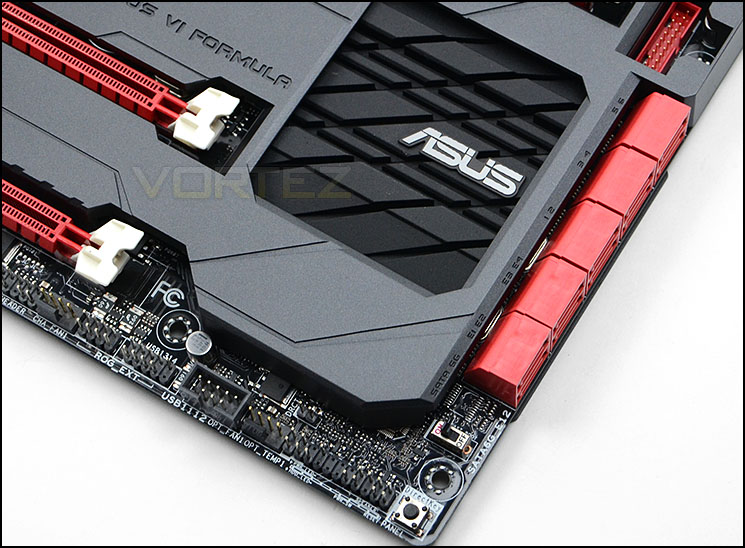
The Intel Z87 heatsink and more features
Turning our attention to the expansion slot area of the motherboard we see that Formula has support for NVIDIA® Quad-GPU SLI™ Technology as well as AMD 3-Way CrossFireX™ Technology. The actual slots comprise of:
• 3 x PCI-E 3.0/2.0 x16 (x16 or dual x8 or x8/x4/x4)
• 1 x mini-PCIe 2.0 x1 *2
• 3 x PCIe 2.0 x1
Underneath the lower PCI-E 3.0 slot is an auxiliary Molex power connector for providing additional power for power hungry configurations.
Running parallel to the graphics region is SupremeFX which is now an essential feature for ROG motherboards. Underneath the ROG armor is a chip and a number of components which deliver high-end audio to the end user. The following is what ASUS have to say about their implementation of SupremeFX on Formula:
SupremeFX Formula delivers premium sound card quality. Combining SupremeFX Shielding technology through physical PCB isolation, grounding separation and EMI cover shielding, while premium components such as ELNA® audio capacitors and German-made WIMA® film capacitors deliver audiophile grade performance. Lossless audio quality is ensured thanks to differential circuit design with high-fidelity operational amplifiers (op-amps) and Cirrus Logic® CS4398 headphone digital/analog converter (DAC) delivering a brilliant 120dB signal-to-noise ratio (SNR). Finally the Texas Instruments® TPA6120A2 600ohm headphone amplifier is able to boost every sound detail.
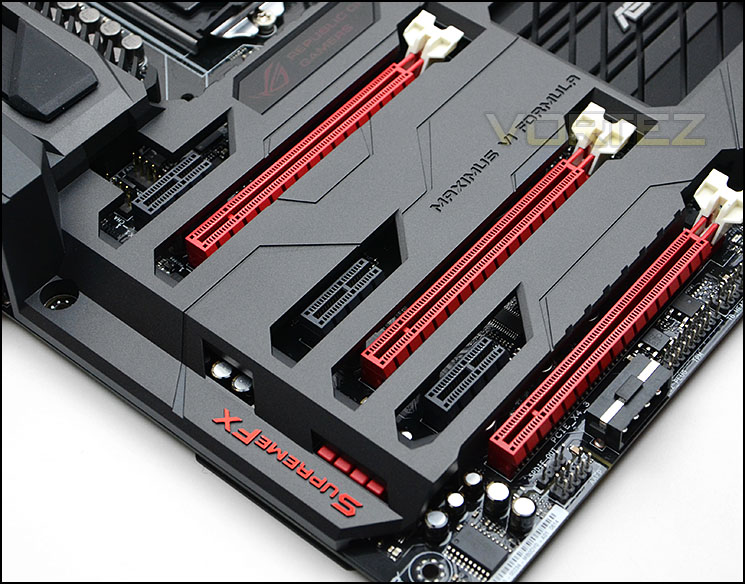
Multi-GPU options for NVIDIA and AMD configurations
Lastly we come to the rear IO which consists of the following:
• 1 x DisplayPort
• 1 x HDMI
• 1 x LAN (RJ45) port(s)
• 6 x USB 3.0 (blue)
• 4 x USB 2.0
• 1 x Optical S/PDIF out
• 6 x Audio jack(s)
• 1 x Clear CMOS button(s)
• 1 x ROG Connect On/ Off switch
On the left side there is a gap for the mPCIe Combo II port and card to reside. ASUS provide a mini PCI Express 2.0 card which delivers Bluetooth 4.0 and WiFi functionality via 802.11ac. This brings WiFi and Bluetooth functionality without having to sacrifice a PCI-E slot. The card also works with M.2 SSDs and has a dedicated socket specifically for this purpose.

The rear IO options


