
For overclocking today's sample we will be using ASUS' GPU Tweak tool as this gives us all of the options we require included the additional voltage controls.

Above is a screenshot of GPU-Z showing the reference (factory overclocked) settings.

...and manually attained overclock speeds.
Overclocking the ASUS Strix GTX 970 was a pleasure. We first reached our limit when overclocking the memory and then set our sights on the core clockspeed. To be truthful we had looked around to see what other people were getting with this card and dialled those settings in. Not content with these figures though we began increasing, testing and increasing again until our sample topped out at an amazing 1334MHz on the core with a little over 7900MHz attained on the GDDR5. Excellent results!
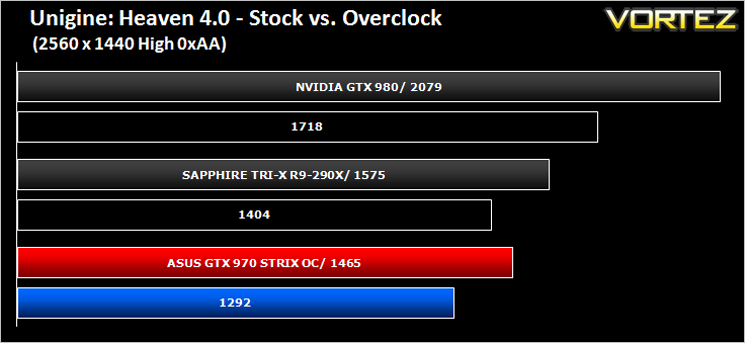
Above we can see the resulting performance increase of the overclock via Unigine Heaven 4.0.
Above is a screenshot of GPU-Z showing the reference (factory overclocked) settings.
...and manually attained overclock speeds.
Overclocking the ASUS Strix GTX 970 was a pleasure. We first reached our limit when overclocking the memory and then set our sights on the core clockspeed. To be truthful we had looked around to see what other people were getting with this card and dialled those settings in. Not content with these figures though we began increasing, testing and increasing again until our sample topped out at an amazing 1334MHz on the core with a little over 7900MHz attained on the GDDR5. Excellent results!
Above we can see the resulting performance increase of the overclock via Unigine Heaven 4.0.


