
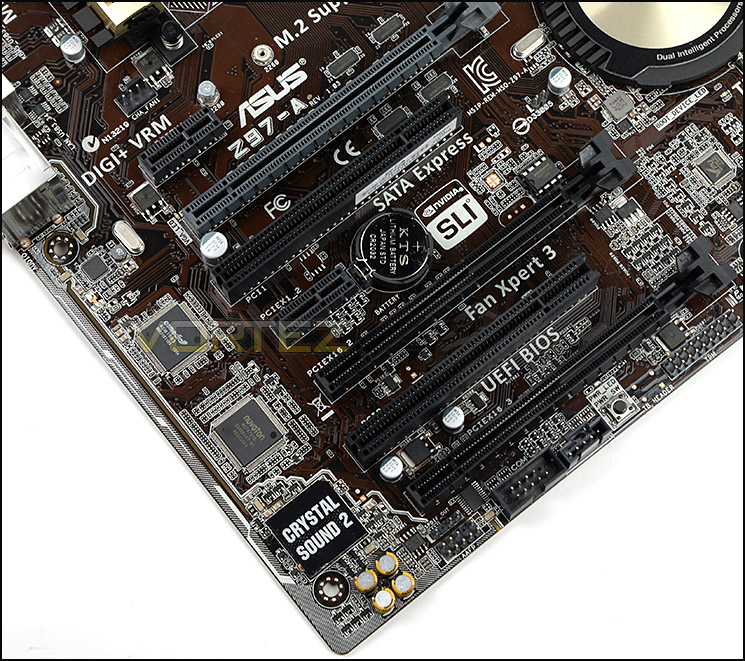
A plethora of options for expansion slots
Turning our attention to the expansion slot area a number of options immediately become apparent through a sensible and logical layout:
• 2x PCI-E 2.0 x1 slots
• 2x PCI-E 3.0/2.0 x16 slots (Running @ x16 / x8)
• 1x PCI-E 2.0 x16 slot (Running @ x4)
• 2x PCI legacy slots
• 2x PCI-E 3.0/2.0 x16 slots (Running @ x16 / x8)
• 1x PCI-E 2.0 x16 slot (Running @ x4)
• 2x PCI legacy slots
Acknowledging that the Z97-A is at the entry-level end of the market ASUS have nonetheless equipped it with support for up to two discrete GPUs, separated sufficiently for air flow to be minimally restricted. Furthermore since the top-most slot is only x1 (and hence unlikely to be populated with full-length expansion cards) very large CPU coolers are compatible and don't foul on the main GPU.
In the lower region of the board resides the audio components. Z97-A uses Crystal Sound 2, a new iteration on ASUS's proprietary feature which more effectively isolates left and right audio channels through dedicated PCB layers, shielding, and an EMI cover. The premium component selection - including Japanese Capacitors dotted throughout - also promises to improve sound quality by reducing electrical noise.
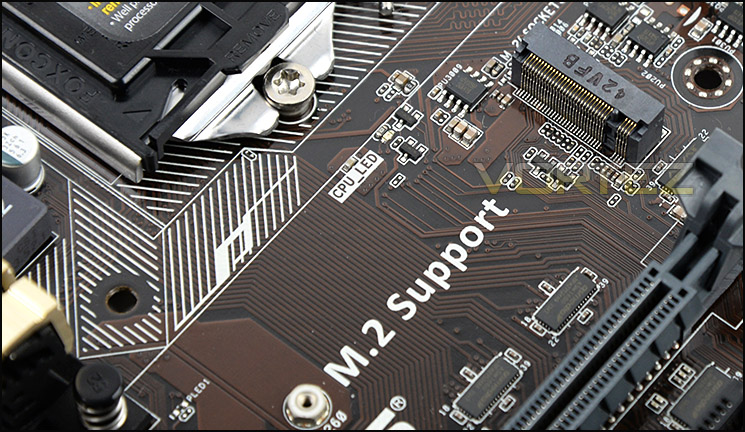
An M.2 slot for even more storage choice
Above the top PCI-E slot ASUS have included an M.2 slot, suitable for SSD storage devices which are type 2260/2280 (i.e. 6cm or 8cm length PCB). Again, not all manufacturers have chosen to include such functionality on the motherboard but it’s great to see it making an appearance as the interface is already being picked up by SSD manufacturers, although few are as yet exploiting its full potential. The M.2 slot also supports Intel's Rapid Storage Technology, allowing it to operate as a cache for slower mechanical drives in a manner which is invisible to the OS.

Rear IO has plenty of functionality
Lastly we come to the Rear IO panel, replete with a generous selection of ports to take advantage of. The arrangement is relative unorthodox, and as you can see dispenses with the traditional 'peripheral I/O at the top' layout we are used to seeing. From the left to right we have the following:
• HDMI port
• Display port
• D-Sub port
• DVI port
• 2x USB 2.0 ports
• PS2 Keyboard/Mouse
• 2x USB 3.0 ports
• Gigabit LAN port
• 2x USB 3.0 ports
• Audio jacks with optical S/PDIF
ASUS have stuck to the Intel NIC rather than utilising more exotic designs, believing that Intel's implementation is not only more cost-effective but also superior to other solutions. Naturally they've augmented it with software such that functionality rivals that their competitors, but don't relegate it to an enthusiast line. Reflecting its affordable nature, the Z97-A still features a legacy D-Sub port.


