
One of the highlights of the CoolIT Domino A.L.C system is the installation. It's surprisingly easy and requires minimal effort. Just to be sure though, CoolIT provide a step by step guide in the manual for setting it up. By default the Domino A.L.C is prepared for LGA1366 mountings and all you have to do is to simply place the back plate behind the motherboard, lining them up with the holes, and screw the FHE (Fluid Heat Exchanger) into them from above. To do so, press the spring loaded screws and twist, using a screwdriver to tighten it. The thermal paste is already pre-applied for convenience.
The rest of the system is a bit harder to install, nonetheless, it's very straight forward. Making sure not to put too much pressure on the tubing and barbs, align the radiator and back fan with the exhaust blow hole. The fan uses rubber fan mounts which you just have to pull through. It does require some wriggling about to get them out of the hole but once done, it allows for vibration free operation.
For AMD and LGA775 systems, the retention bracket has to be disassembled and refitted by removing 4 "C" clips and moving the spring loaded screws in different notches.
Observations
On starting up the computer, I noticed the hazard warning beeping but this was only due to the fact that it initially didn't have enough power to feed the fan and pump. By the time the computer had gone past the post screen, it was no longer an issue. I still had to make do with the beeping every time I switched on the computer though. I won't take any points from CoolIT because it was mostly something to do with the motherboard or power supply. In fact, I commend it on the fact that they implemented a warning system that worked accordingly.
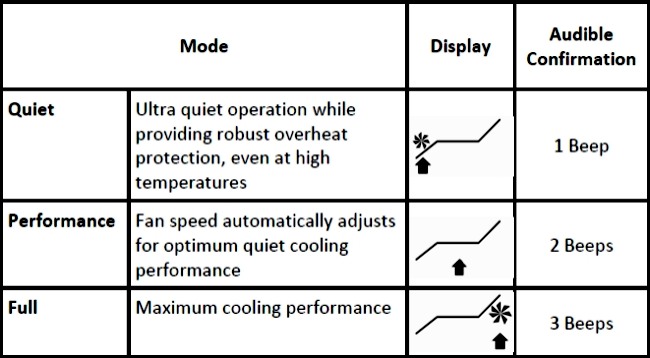
The downside of using it in my case was that I could not read the LCD screen but this was built for windowed cases and as such, it's an excellent accessory to have. The display is clearest when viewed straight on and it was sharp and easy to read everything. All the information is relevant and the additional graphics gives a good representation of the setting it's on, as shown in the above illustration. Changing mode is also very simple and quick. At the press of a button, you will be greeted by a beep to confirm the mode.
The fan speed ranged from 1200-2700rpm from Quiet mode to Full. Performance was a good compromise in terms of noise and gave adequate cooling. When in Full mode, the fan still slowed down when the temperatures weren't high, to lower noise levels. On the whole though, I was a bit disappointed with the noise level it generated for a cooler marketed for its silence. In Quiet mode, it was barely audible and ramping it up into Performance mode made the fan speed up to 1600rpm which was above the level of my case fans. It is still bearable though and if you are gaming or listening to music, this would be the perfect setting. Full mode on the other hand was like a mini tornado with the fan at a stormy 2700rpm. Unless you are using a headset, it will be hard to cope with the sheer noise generated. The alternative is to place the computer away from you! The pump speed remains at 3000rpm no matter what setting is selected. The main problem about the mode switching though is that you need to remove the side panel to gain access to the button. Thankfully the Domino A.L.C is able to automatically control the speed based on the temperatures.
The rest of the system is a bit harder to install, nonetheless, it's very straight forward. Making sure not to put too much pressure on the tubing and barbs, align the radiator and back fan with the exhaust blow hole. The fan uses rubber fan mounts which you just have to pull through. It does require some wriggling about to get them out of the hole but once done, it allows for vibration free operation.
For AMD and LGA775 systems, the retention bracket has to be disassembled and refitted by removing 4 "C" clips and moving the spring loaded screws in different notches.
Observations
On starting up the computer, I noticed the hazard warning beeping but this was only due to the fact that it initially didn't have enough power to feed the fan and pump. By the time the computer had gone past the post screen, it was no longer an issue. I still had to make do with the beeping every time I switched on the computer though. I won't take any points from CoolIT because it was mostly something to do with the motherboard or power supply. In fact, I commend it on the fact that they implemented a warning system that worked accordingly.
The downside of using it in my case was that I could not read the LCD screen but this was built for windowed cases and as such, it's an excellent accessory to have. The display is clearest when viewed straight on and it was sharp and easy to read everything. All the information is relevant and the additional graphics gives a good representation of the setting it's on, as shown in the above illustration. Changing mode is also very simple and quick. At the press of a button, you will be greeted by a beep to confirm the mode.
The fan speed ranged from 1200-2700rpm from Quiet mode to Full. Performance was a good compromise in terms of noise and gave adequate cooling. When in Full mode, the fan still slowed down when the temperatures weren't high, to lower noise levels. On the whole though, I was a bit disappointed with the noise level it generated for a cooler marketed for its silence. In Quiet mode, it was barely audible and ramping it up into Performance mode made the fan speed up to 1600rpm which was above the level of my case fans. It is still bearable though and if you are gaming or listening to music, this would be the perfect setting. Full mode on the other hand was like a mini tornado with the fan at a stormy 2700rpm. Unless you are using a headset, it will be hard to cope with the sheer noise generated. The alternative is to place the computer away from you! The pump speed remains at 3000rpm no matter what setting is selected. The main problem about the mode switching though is that you need to remove the side panel to gain access to the button. Thankfully the Domino A.L.C is able to automatically control the speed based on the temperatures.


