
As mentioned on the previous page, we’ve made some recent changes to our cooling department and the testing methodology. Therefore our results graphs are starting from fresh – we’re working tirelessly to populate these graphs, but we hope you can appreciate that these results must be done fairly, and more importantly, correctly.
Perhaps even more important than thermal performance is the acoustic qualities of a CPU cooler; it’s all well and good having a cool CPU, but if you can’t hear yourself think while it’s running, it’ll soon wear thin.
We take a look at acoustics while idle, with the CPU at stock clocks and overclocked. The Corsair H100i Pro can turn its fans off entirely, but for fairness, we used the Balanced profile within the Corsair Link software. Once the fans have switched off entirely the noise dropped to 25dB, the only audible sound was coming from the pump.
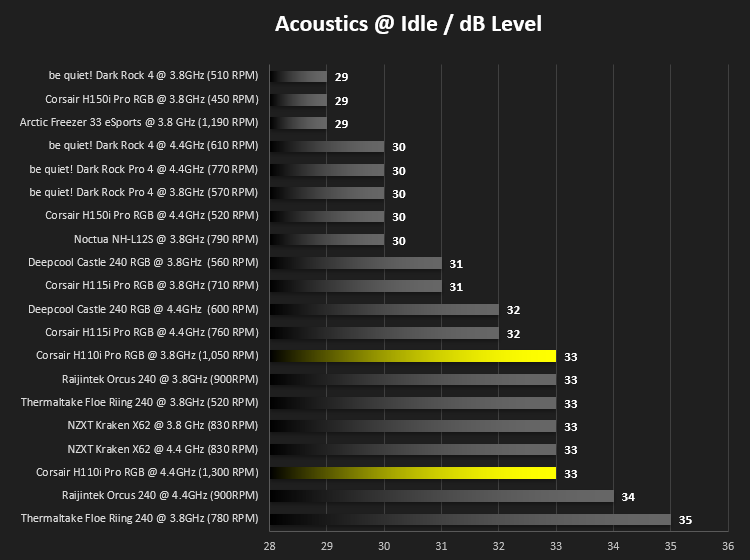
Unfortunately, the H100i Pro RGB doesn't do well in the idle test. The fans are spinning far too fast to call itself "quiet", even by any stretch of the word. We're quite shocked by this result, with the H150i Pro RGB and H115i Pro RGB both featuring the same pump and similar fan configurations, with the 115i using a pair of 140mm fans instead of a pair of 120mm.
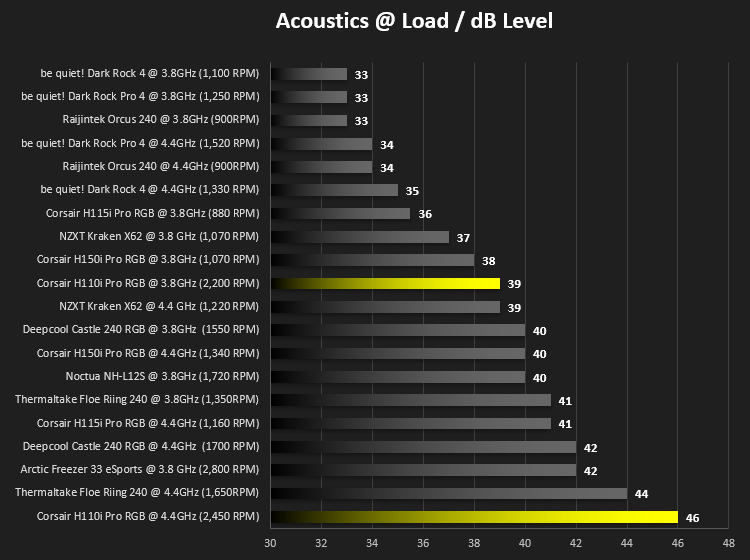
Bottom of the graph. Not somewhere we expected to see a Corsair Hydro CPU Cooler. 46dBA is far too loud, by anyone's standards, and certainly nowhere near something we can recommend for daily usage.
Explanation?
At this point, we removed the pump from CPU, cleaned up all of the thermal paste, reapplied it and paid some serious attention to the installation method. We're satisfied that the cooler is installed as straight and true as possible so we ran our tests again. The results were almost identical, save for a degree or two here and there.
Corsair Link provides a details insight into the operations of the CPU cooler, showing pump speeds, coolant temperature, fan speeds and LED lighting, all in real-time. We decided to take a look at the fan curves and discovered they were massively aggressive, even on the "Quiet" setting. We didn't see fan speeds drop below 1,100 RPM throughout our entire testing session, despite being capable of as low as 400 RPM (roughly 16% of the maximum).
Corsair could provide a software update for this, we're certain, but if you take the time to set up a custom fan curve, you can bring the idle and load acoustics right down without a huge effect on the temperatures. It took us about 15 minutes of tweaking numbers to find the sweet spot, improving the overall temperature and acoustics drastically.
Also, please remember that these fans are capable of turning themselves off. We found our CPU remained under 40°C at idle, for over 45 minutes, without the fans kicking in once, relying solely on airflow from the case fans.
Perhaps even more important than thermal performance is the acoustic qualities of a CPU cooler; it’s all well and good having a cool CPU, but if you can’t hear yourself think while it’s running, it’ll soon wear thin.
We take a look at acoustics while idle, with the CPU at stock clocks and overclocked. The Corsair H100i Pro can turn its fans off entirely, but for fairness, we used the Balanced profile within the Corsair Link software. Once the fans have switched off entirely the noise dropped to 25dB, the only audible sound was coming from the pump.
Unfortunately, the H100i Pro RGB doesn't do well in the idle test. The fans are spinning far too fast to call itself "quiet", even by any stretch of the word. We're quite shocked by this result, with the H150i Pro RGB and H115i Pro RGB both featuring the same pump and similar fan configurations, with the 115i using a pair of 140mm fans instead of a pair of 120mm.
Bottom of the graph. Not somewhere we expected to see a Corsair Hydro CPU Cooler. 46dBA is far too loud, by anyone's standards, and certainly nowhere near something we can recommend for daily usage.
Explanation?
At this point, we removed the pump from CPU, cleaned up all of the thermal paste, reapplied it and paid some serious attention to the installation method. We're satisfied that the cooler is installed as straight and true as possible so we ran our tests again. The results were almost identical, save for a degree or two here and there.
Corsair Link provides a details insight into the operations of the CPU cooler, showing pump speeds, coolant temperature, fan speeds and LED lighting, all in real-time. We decided to take a look at the fan curves and discovered they were massively aggressive, even on the "Quiet" setting. We didn't see fan speeds drop below 1,100 RPM throughout our entire testing session, despite being capable of as low as 400 RPM (roughly 16% of the maximum).
Corsair could provide a software update for this, we're certain, but if you take the time to set up a custom fan curve, you can bring the idle and load acoustics right down without a huge effect on the temperatures. It took us about 15 minutes of tweaking numbers to find the sweet spot, improving the overall temperature and acoustics drastically.
Also, please remember that these fans are capable of turning themselves off. We found our CPU remained under 40°C at idle, for over 45 minutes, without the fans kicking in once, relying solely on airflow from the case fans.


