
As mentioned on the previous page, we’ve made some recent changes to our cooling department and the testing methodology. Therefore our results graphs are starting from fresh – we’re working tirelessly to populate these graphs, but we hope you can appreciate that these results must be done fairly, and more importantly, correctly.
Perhaps even more important than thermal performance is the acoustic qualities of a CPU cooler; it’s all well and good having a cool CPU, but if you can’t hear yourself think while it’s running, it’ll soon wear thin.
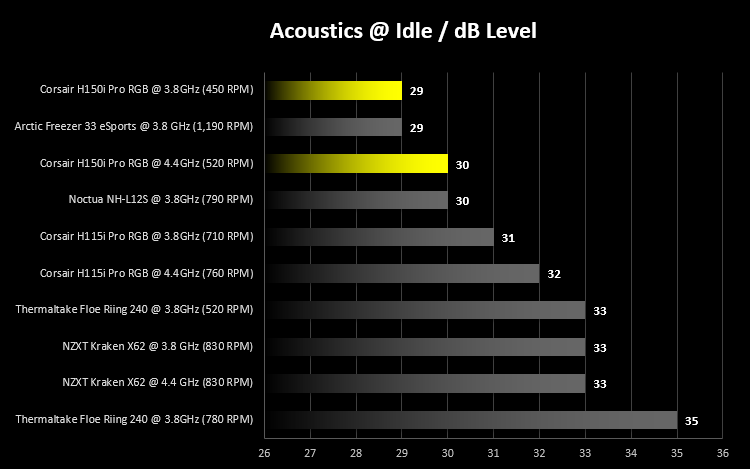
We take a look at acoustics while idle, with the CPU at stock clocks and overclocked. The Corsair H150i Pro can turn its fans off entirely, but for fairness, we used the Balanced profile within the Corsair Link software. Once the fans have switched off entirely the noise dropped to 25dB, the noise was coming from the pump only.
The Balanced profile spins the ML120 fans at 450 RPM at stock, with them bumping up slightly to 520 RPM when overclocked to 4.4GHz.
Our acoustics tests show this cooler to be tied as quietest with the Arctic Freezer, with the noise only increase by a solitary dB when overclocked. Again, excellent performance at idle.
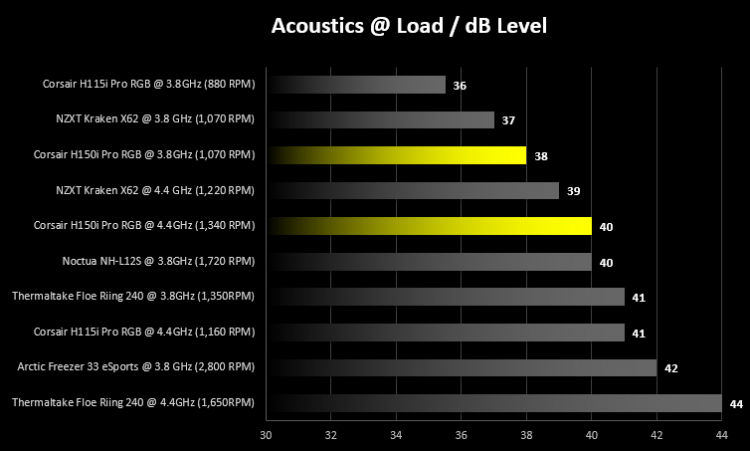
Moving onto our load tests, we read the noise levels after a 30 minute run of AIDA64’s Stress Test facility. The NZXT has a chance to flex its muscles here, with those larger 140mm fans, however the Corsair’s cooling performance does negate these small differences in noise levels. You can draw your own conclusions from this graph.
Perhaps even more important than thermal performance is the acoustic qualities of a CPU cooler; it’s all well and good having a cool CPU, but if you can’t hear yourself think while it’s running, it’ll soon wear thin.
We take a look at acoustics while idle, with the CPU at stock clocks and overclocked. The Corsair H150i Pro can turn its fans off entirely, but for fairness, we used the Balanced profile within the Corsair Link software. Once the fans have switched off entirely the noise dropped to 25dB, the noise was coming from the pump only.
The Balanced profile spins the ML120 fans at 450 RPM at stock, with them bumping up slightly to 520 RPM when overclocked to 4.4GHz.
Our acoustics tests show this cooler to be tied as quietest with the Arctic Freezer, with the noise only increase by a solitary dB when overclocked. Again, excellent performance at idle.
Moving onto our load tests, we read the noise levels after a 30 minute run of AIDA64’s Stress Test facility. The NZXT has a chance to flex its muscles here, with those larger 140mm fans, however the Corsair’s cooling performance does negate these small differences in noise levels. You can draw your own conclusions from this graph.


