
Typically, keyboards of this calibre are purchased with gaming as the main focus, and daily tasks take a bit of a side-line; thankfully, the STRAFE MK.2 performs amazingly well while gaming. The Cherry MX Silent key switches, which are essentially a Cherry MX Red key switch with some additional noise dampening, felt very responsive but lacked any kind of tactile feel whatsoever. If this sounds like your type of mechanical key, we would recommend this over the Red key switch purely for the quieter keyboard. It will also be ideal for those who intend to purchase this keyboard for an office or work environment where colleagues may quickly become annoyed by the tick tack of a Cherry MX Blue or Brown; they’re also suited well for the streamer market, avoiding any annoying noise being picked up by your expensive microphone.
Sticking with the gaming tests, swapping out the standard keys for the tactile keycaps, with a chequer plate effect on top, they provide an quantifiable, tangible difference that makes the keys easier to find, while also making the keyboard look a little bit more focussed than your traditional black and white layout.
To help you remain within the game, the Windows Lock key can be configured to block the functions of several keys while active. Alt + Tab, Alt + F4, Shift + Tab and Windows Key can all be disabled with the press of a single button, handy if you take your gaming seriously.
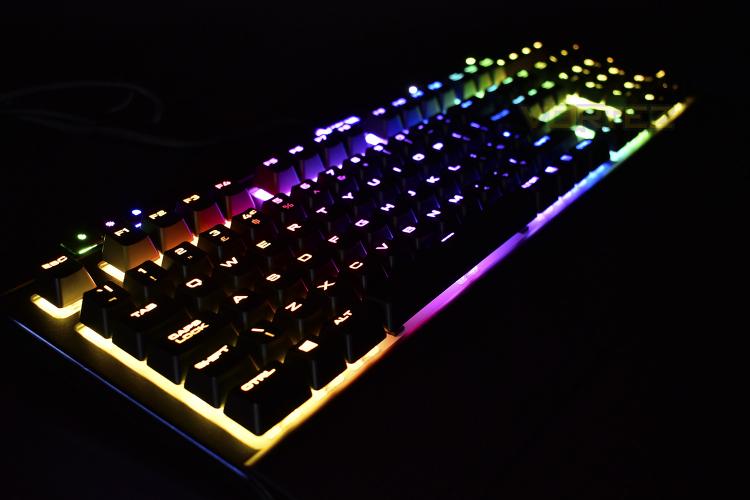
Thanks to that white backing, behind the keycaps, the RGB lighting pops out much more than the K70 equivelant. Thanks to the iCUE software, configuring beautiful lighting effects is no hassle either, with plenty of presets that look awesome. The STRAFE also features lighting on the right and left edges of the keyboard, just beneath the plastic faceplate. This can be illuminated within the settings but can only be configured with white lighting – that’s a shame considering the focus Corsair have placed on the LEDs on the front of the keyboard. They can be toggled on and off independent of the rest of the keys, however.
Media keys, something the original STRAFE lacked. We now get a full plethora of media keys, as well as a mute switch and a beautiful volume wheel. This is something we constantly praise Corsair on for pure ease of use and the excellent tactile feel.
While the STRAFE appears to be made from plastic and perhaps may not have quite the same structural strength as the K70 MK.2 cousin, we can confirm that the STRAFE is just as strong and well-built. The materials used provide a solid base to fully support the abuse a keyboard can receive in a heated online game.
As is the case with any Corsair keyboard, the wrist rest is made from solid plastic, while this isn’t ideal, instead preferring something a little more cushioned, having a wrist rest at all is important for long stints of play, helping to maintain a straight line from the hand, through the wrist, into the arm.
As a final point, one very important feature we’ve seen added to the MK.2 is a profile switch. The 8MB onboard memory can store three entirely separate profiles, with Macros and lighting effects, which can then be used on any computer, even without installing the Corsair iCUE software.
Sticking with the gaming tests, swapping out the standard keys for the tactile keycaps, with a chequer plate effect on top, they provide an quantifiable, tangible difference that makes the keys easier to find, while also making the keyboard look a little bit more focussed than your traditional black and white layout.
To help you remain within the game, the Windows Lock key can be configured to block the functions of several keys while active. Alt + Tab, Alt + F4, Shift + Tab and Windows Key can all be disabled with the press of a single button, handy if you take your gaming seriously.
Thanks to that white backing, behind the keycaps, the RGB lighting pops out much more than the K70 equivelant. Thanks to the iCUE software, configuring beautiful lighting effects is no hassle either, with plenty of presets that look awesome. The STRAFE also features lighting on the right and left edges of the keyboard, just beneath the plastic faceplate. This can be illuminated within the settings but can only be configured with white lighting – that’s a shame considering the focus Corsair have placed on the LEDs on the front of the keyboard. They can be toggled on and off independent of the rest of the keys, however.
Media keys, something the original STRAFE lacked. We now get a full plethora of media keys, as well as a mute switch and a beautiful volume wheel. This is something we constantly praise Corsair on for pure ease of use and the excellent tactile feel.
While the STRAFE appears to be made from plastic and perhaps may not have quite the same structural strength as the K70 MK.2 cousin, we can confirm that the STRAFE is just as strong and well-built. The materials used provide a solid base to fully support the abuse a keyboard can receive in a heated online game.
As is the case with any Corsair keyboard, the wrist rest is made from solid plastic, while this isn’t ideal, instead preferring something a little more cushioned, having a wrist rest at all is important for long stints of play, helping to maintain a straight line from the hand, through the wrist, into the arm.
As a final point, one very important feature we’ve seen added to the MK.2 is a profile switch. The 8MB onboard memory can store three entirely separate profiles, with Macros and lighting effects, which can then be used on any computer, even without installing the Corsair iCUE software.


