
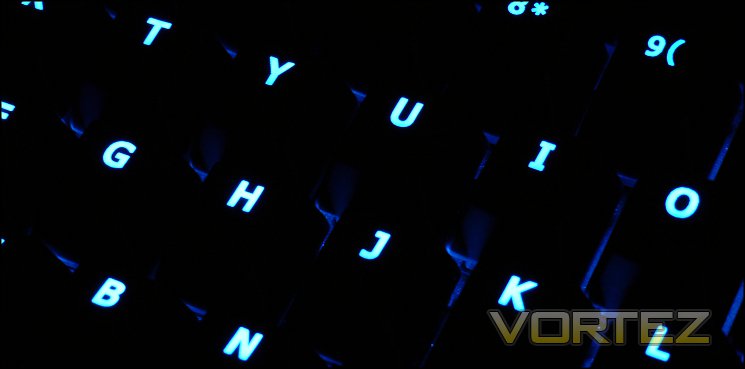
The GIGABYTE Aivia Osmium features Cherry MX Red switches, which we've discussed in previous reviews. They're an ideal switch for the first foray of a gamer into mechanical keyboards as they feature lightweight linear actuation with no tactile feedback, i.e. click. More heavyweight Black switches are a slightly more acquired taste, typically sought out by experienced users of multiple switch types as they require much more force to actuate. As no Black option is available for these keyboards, at their current retail price it's best to be sure that MX Reds are to your own taste.
Osmium keycaps are a UV coated, matte black finished translucent plastic with alphanumeric symbols etched into the top. The paint finish is even with no blemishes so far as we can see, and doesn't have the same uncomfortable 'blackboard' feel of some mechanical keyboards on the market today whilst achieving the coveted non-slip effect. A rigid metal backplate supports the keyboard, ensuring that there is minimal flex on striking the keys.
The layout of the Osmium is reassuringly standard - with the only major departures from a UK-layout being G-Keys and control wheels above the F-keys it should be familiar to any user. Switching profiles is a snap through the Aivia button on the top-right of the keyboard - on other keyboards this is typically dead space containing a few indicator LEDs - and so nothing is lost by including it. One pleasant addition is the win-lock function, which when pressed simultaneously with the Windows-key enables or disables it; for a gamer, being able to do this in hardware rather than a software work-around is excellent.
Typing and word-processing on the Osmium is very good, although slightly more easy to 'fat-finger' than other mechanical keyboards we've tested due to the fractionally wider keycaps. Although it lacks some of the softness many prefer on membrane keyboards, it more than makes up for it in precision and responsiveness without being quite at the high-end of the latter seen with Cherry MX Black switches. Keystrokes are consistent across the keyboard with one or two exceptions, and whilst a little narrower than normal take little getting used to. One reservation we did have is with the ENTER key, which has a flat rather than curved surface and sits proud on the keyboard - it's far from problematic, but isn't consistent with the rest of the keyboard and is likely a variation specific to the UK layout.
One issue which presents with many keyboards, especially those where you're hammering the keys, is where the underside doesn't grip the desk well enough and it begins to wander. The four rubber feet of the Osmium grip extremely well, holding the keyboard in place even though the nature of mechanical keyboards would work against it.
Thanks to the removable keycaps and supplied tool the keyboard is a cinch to clean, a feature it shares with most mechanical keyboards. The keycaps themselves were also relatively resistant to the buildup of grime over the course long gaming sessions, which is nice to see. The overall keyboard housing is a little less resistant to dirt due to the textured finish; when cleaning you will need to be sure to use a lint-free cloth.
Anti-Ghosting/ N-Key Rollover
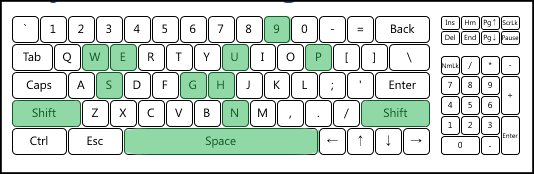
Up to 64 simultaneous keystrokes are advertised in the Osmium's anti-ghosting feature, an extremely impressive number for USB keyboards when 6 or 12-key rollover is the standard. This feature is notoriously difficult to test due to the sheer number of possible combinations on a standard keyboard, and in the past was only seen on keyboards which utilised PS2 connections (thanks chiefly to limitations of the USB protocol).
A solid port of call is Aquakey, a small application which tracks the keypresses registered by the OS and displays them on a convenient UI; Microsoft offer a similar web-based service here. Testing all combinations simply isn't feasible, but important ones such as around the standard gaming WASD keys are more than possible and often present themselves during gaming, especially MMO gaming. Here the Osmium performed exceptionally, with well over 30 simultaneous keypresses logged and no issues reported around the crucial WASD keys.
Gaming Performance
We took a look at three common gaming titles representing three distinct gaming types to see how well the keyboard was suited to gameplay and if any issues cropped up. The following is a summary of our conclusions.
Team Fortress 2
The ubiquitous free to play FPS enjoyed by thousands on a daily basis posed no barrier for the Osmium which was responsive at all times. The short actuation length aided in this, whilst Cherry MX Red switches provided predictable response times. We did feel the need to be a little more precise in our keystrokes with the Osmium than some other keyboards we have tested as it felt a little easier to hit and actuate adjacent keys than in the past; note that this will vary greatly from person to person.
The Osmium has a standard layout, allowing much easier transitioning from old to new keyboard than it might be. The one note of variation - Osmium's G-Keys - are sufficiently disparate from the main keyboard to be no impediment. The G-Keys themselves are generally speaking less useful 'in the thick of battle' as they're quite some distance from the WASD keys. However for functions such as character selection and loadout shortcuts they are ideal, especially if bound to a sequence of shortcut keys. In this regard, the ability to programme in delays to macro'd keystrokes is also extremely useful.
Starcraft & Torchlight 2
Torchlight 2 and Starcraft represent genres where your fingers tend to migrate across the keyboard a little more than a TF2-esq FPS. Response and precision are all important, as are fast successive keypresses. In the case of Starcraft, utilising a rhythm through a predictable and regular response from the key aids in developing muscle memory.
The Cherry MX Red switches of the Osmium were easily up to the task, and provided generally even responses throughout the keyboard. The inclusion of a wrist-rest somewhat surprisingly did help to make long gaming sessions easier on the wrists and fingers, not always a case with such features.
Macro keys by contrast were less useful. The positioning makes them a little less easy to access compared to if they were to the left of the keyboard, and these sorts of less frequently used one-off macros are less often used than in FPS's. MMORPG gameplay will by contrast have significantly more use from these G-Keys, but generally in wider open-world gameplay rather than mid-battle.
Overall, the Osmium performed with aplomb, and whilst the macro keys will generally be a limited value there are key productivity and gaming niches which will be able to exploit them to the fullest extent.


