
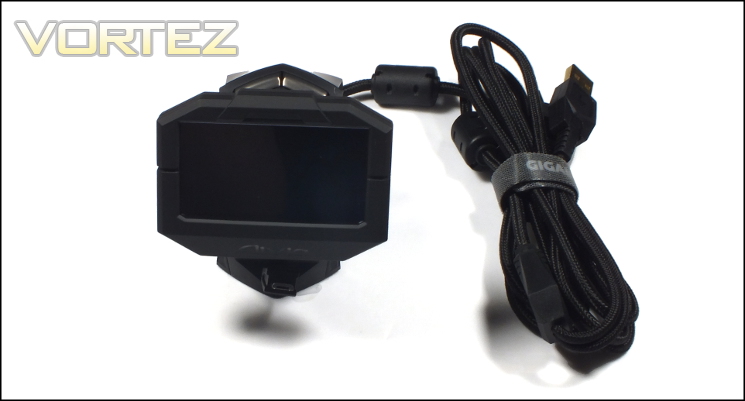
As wireless receivers go the GHOST Macro Station is sizeable and has more in common with the docking stations of rechargeable mice of old than today’s more common USB micro-receivers. It stands 80mm tall, with a footprint of 70mm x 80mm making it large enough to not get lost on a relatively tidy desk. GIGABYTE leverage this size to its advantage by including two rubber feet at the base, holding it in place despite the weight of the braided USB cable used.
Fixed to the front and on a articulated support is a monochrome OLED screen with a 128px x 64px resolution. The display is naturally angled at approximately 10 degrees from the vertical, and can be angled a further 40 degrees depending on the preferences of the user. Below the screen is an LED illuminated Aivia logo, capable of ten colours and typically used to indicate the active mouse profile.
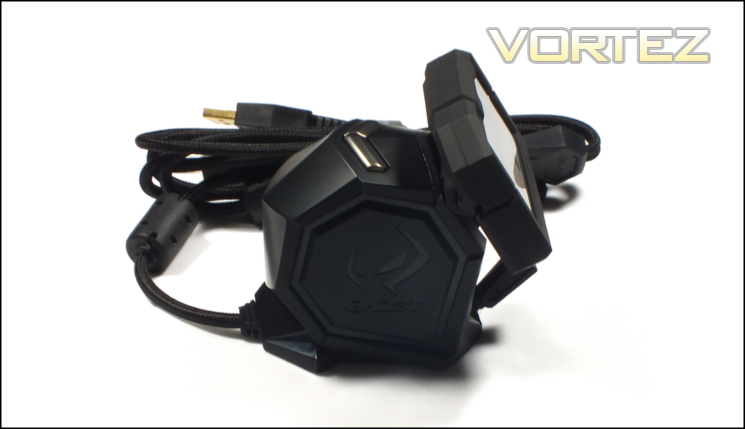
OLED displays are an interesting technology. They illuminate on a per-pixel basis rather than using a backlight and LCD panel, and hence provide an excellent contrast between blacks and intense colours. The Uranium’s Macro Station is limited to a monochrome panel, but it keeps the text extremely sharp despite the relatively low resolution. Mindful that the panel could appear to be very bright in low-light conditions the top of the base station is equipped with two buttons to adjust the overall brightness of the display between five pre-determined levels.
At the base of the Macro Station is a retractable mini-USB ribbon cable designed for charging the Uranium mouse and then hiding unobtrusively. This spring-loaded cable is packed away neatly when not in use but is still light-weight enough to allow uninhibited mouse movement when plugged in. Although notationally 50cm long, out sample stretched to 60cm without problems.
As a final mark of quality GIGABYTE have seen fit to braid the Macro Station’s main USB cable and also included a Velcro cable tidy to tie up any unnecessary length. This gives the cable an inherent rigidity which may have been a problem in a lightweight base station design. However the cable extrudes from the base at a horizontal angle, ensuring that it doesn’t lever up the Station when sat on a flat surface.
--
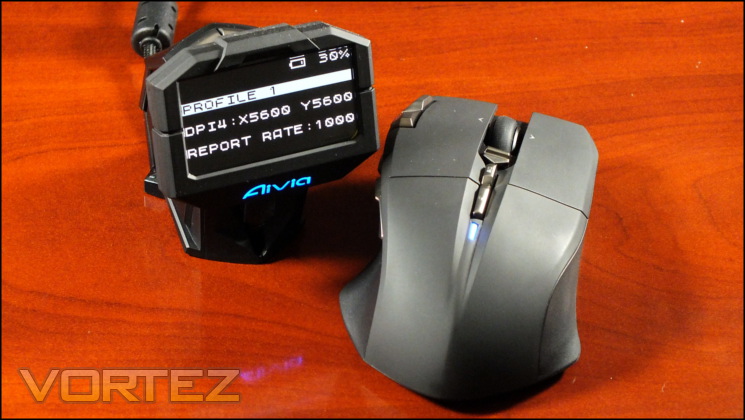
The GHOST Macro Station displays four pieces of core information by default: mouse battery charge level (in 10% increments), Active Profile, horizontal and vertical DPI, and USB report rate (in Hz). By pressing the configuration button on the mouse (labelled with two squares) the menu items are selectable and editable. An illuminated blue LED at the rear of the mouse indicates that it’s in configuration mode, and that mouse input is no longer passed to the OS; pressing the config. button again will exit this mode.
Navigation through the menus is controlled via the scroll, tilt and middle-click inputs of the scroll wheel. Editing DPI levels and Report Rate specifically is simple: tilt ‘right’ when highlighted, scroll to select desired level, middle-click to confirm changes. It’s notable that DPI and Report Rate changes apply to all profiles, which isn’t necessarily expected behaviour for gaming mice.
By navigating through the Profile menu option it’s possible to make new button assignments on a per-button basis. Mirroring the Ghost software’s functionality you can map basic commands such as default mouse buttons, multimedia functionality, common windows functions etc. Alternatively you can map specific keys (unmodified, i.e. no ALT or CTRL+keystroke), or assign a pre-created macro. The one downside is that macros can still only be created in software, but in fairness expecting the mouse to be able to cope with this could would be expecting a bit too much.
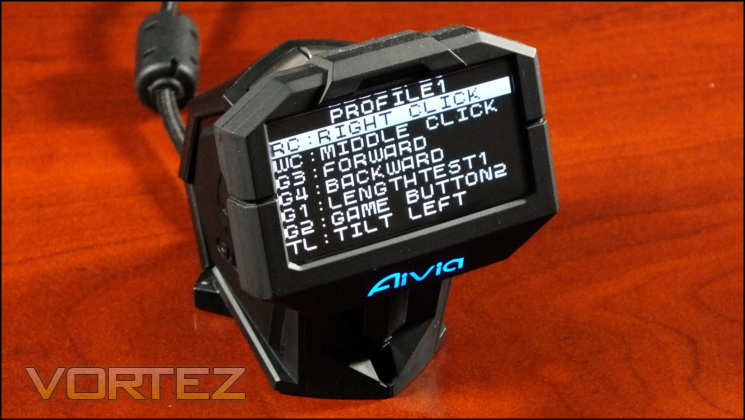
If a macro or keystroke assignment is made to the mouse then that is explicitly listed in the profile button assignments. This makes troubleshooting your profile relatively simple, although the exact keystokes which make up a macro aren’t able to be shown on the display.
As additional functionality which we weren’t expecting, the GHOST Macro Station also includes a Cooldown Timer. Configurable only in software, any particular button can be set to begin a countdown timer that once expired displays on the OLED screen. It’s a niche use, but pretty cool. For anyone who favours hotkey-style MMOs or MOBA-esq game titles it could be really valuable, so long as the display is somewhere in your field of view.
The OLED screen is very sharp, and the GHOST macro station is an interesting take on the solving the problem delivering low-latency macros in a wireless gaming mouse. Where previously the entire macro would be sent, here the only data passed is that of a specific button press/release event. Macro data is stored on the base station, and thus still allows you to migrate the mouse between systems without losing profile information for games/other application.
The largest problem is that the functionality is largely quite basic for premium grade software. That’s not intended as an attack on the solution, which is a logical one, but rather that in needing to mimic the software functionality it’s perhaps not quite as comprehensive as it could be when compared to the capabilities of wired gaming-grade mice.
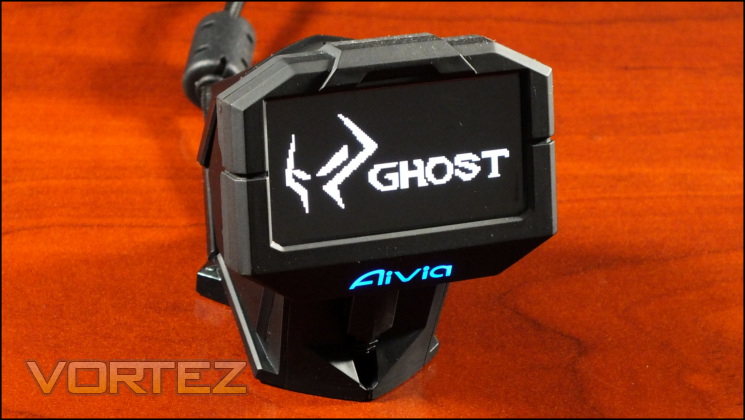
One other thing to note: the OLED screen also has a user-defined screensaver, which is imported via the GHOST software. The default resolution matches that of the screen, 128 x 64. The screen is only mono-chrome (i.e. black and white), but if a colour bitmap (.bmp being the only file type supported) is imported you are given the option of choosing a threshold for pixel intensity and thus a creating a natural silhouette. Generally speaking though you’ll have more success using an image editor and then saving in a native monochrome format. We just wish that it was possible to use this image by default rather than have the detailed information only displayed the vast majority of the time.
In the fullness of time it would be interesting to see if the API could be opened up to allow in-game notifications to be displayed. As it is, it shows a lot of promise, but not much more than that.


