
Power Consumption
To test for power consumption we use the included iPower Meter found with our Thortech PSU. As system load figures obviously differ from idle it is extremely difficult to get an accurate figure of system draw and then simply take this figure away from the overall amount because each game will generate varying levels of CPU and hard drive activity. Dynamic power adjustments which fluctuate in game will also affect accurate power figures thus rendering any such power consumption calculations redundant at worst and approximate at best.
We will therefore take our system readings averaged over a benchmark run of Tessmark (100% load) and after 20 minutes of being idle in Windows 7. These can then be used as a comparison to other graphics cards to determine how much more or less power you can expect a GPU to consume.

Consuming just a little more than the reference design this is quite a good result from GIGABYTE considering the extra power port.
Temperature
To test temperatures we measured idle temperatures after booting windows, letting all applications finish loading and ran a few benchmarks. Once the benchmarks were complete we left the card to reach a cooling plateau where we then took the idle temperatures. For the load tests, we would normally run Furmark for 20 minutes, taking the absolute maximum temperature attained however we found that this throttled the card and resulted in spurious results. So we set Heaven running continuously for 20 minutes and used this as a temperature result as the card did not throttle with this application.
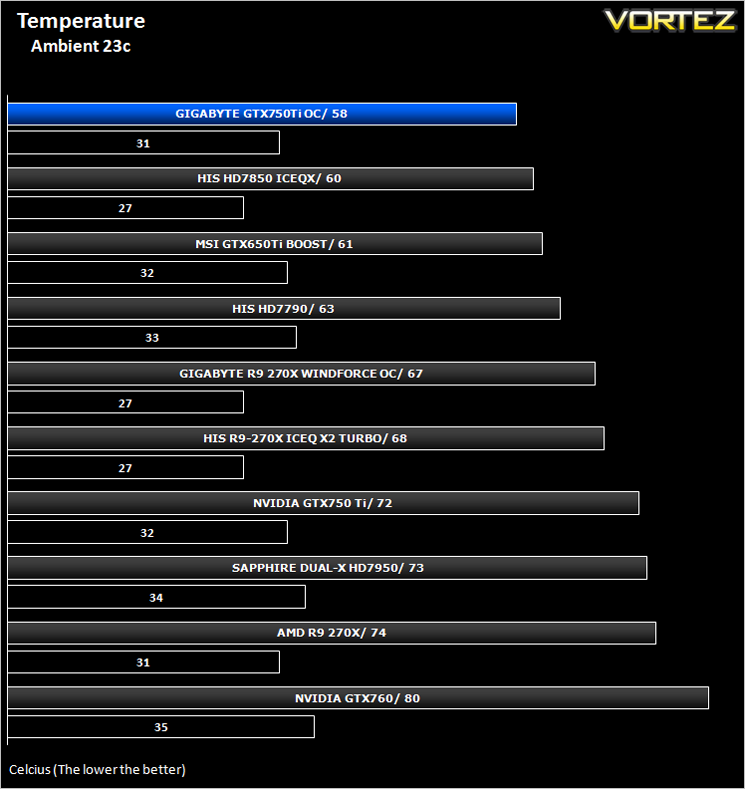
As we previously wrote, the NVIDIA GTX750 Ti would be a seriously cool running card with additional cooling and as you can see above that despite the extra clockspeed and power pumping through the core, the Windforce design coupled with Maxwell technology proved to be a very cool runner.
Acoustics
Silent. That is pretty much the only word to describe the card under normal operating conditions. We certainly couldn't hear it over good case fans. While there was some noise when manually setting the fans to 100%, there is really no need to do this as the card is cool enough without manually raising the fan speed profile.


