
Unlike Sandybridge, overclocking on X58 takes a lot more effort. Some might say it's more enjoyable as there are a lot more variables to configure to get the absolute maximum from the setup. With multiple dividers and voltages to tweak, you can quite honestly adjust, test, re-adjust, for hours, even days on end until you find the absolute best settings.
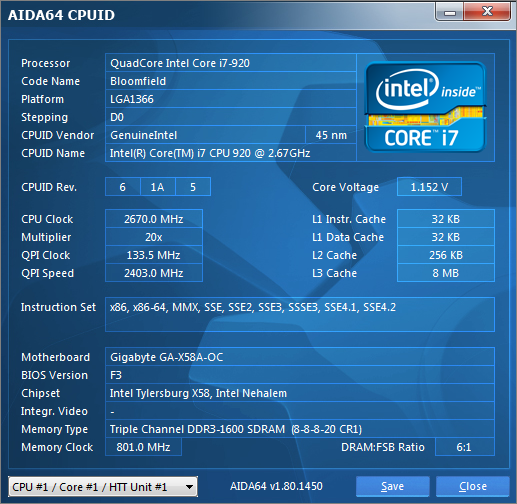
Above is a shot of the 'stock' settings we will use for comparison during our run of benchmarks. This was however tweaked slightly as the ASUS board placed the stock value at 2667MHz so using the on-board baseclock adjuster along with the 'gear' button which allowed 0.3MHz adjustment, we raised the GIGABYTE's value by 1MHz to make it an even playing field.
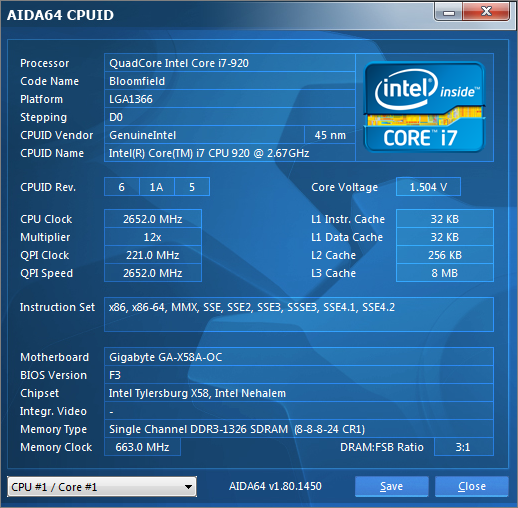
The maximum baseclock I ever attained on this particular CPU was 215MHz. As you can see above, the GIGABYTE stomped all over this value reaching 221 with relative ease. Sadly no matter what I adjusted or how far I dared push the voltages it would not go over this value. This was attained using a PCIe frequency of 118 MHz I was dissappointed with this truth be told, especially when you consider the motherboard currently holds the world record for the highest baseclock (276MHz)! That said, I am confident this is not the motherboard at fault, rather it is our mediocre CPU.
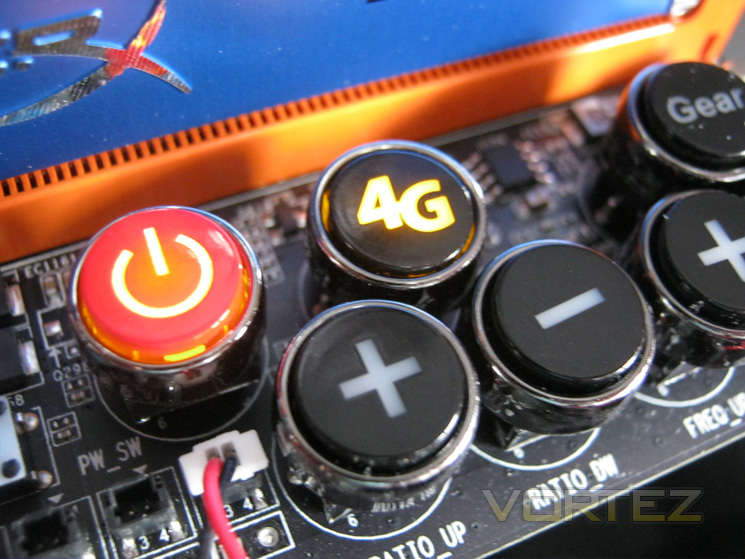
A nice little feature of the X58A-OC is the 4G button which when pressed will load a BIOS profile configuring the CPU to run at 4GHz. Understandably, extreme overclockers have no need for such a feature but for those who want a quick (and stable!) overclock after hours of messing with instability, the 4G button acts as a reprieve.
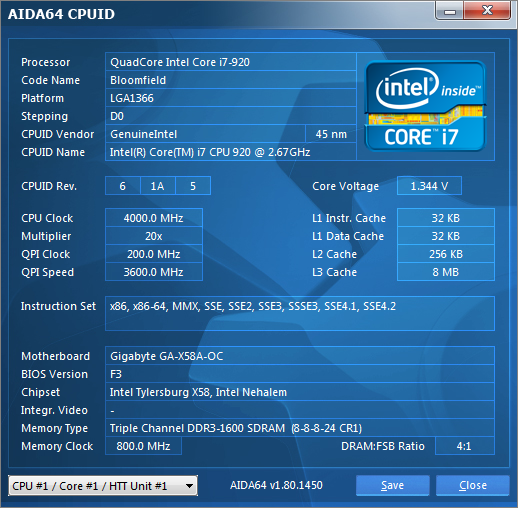
I had my doubts whether the 4G button would actually represent a good BIOS setting. However I am happy to report than none of the pre-set voltages were excessive and they would be quite safe for air-cooling. The Vcore was a little higher than what I have found this chip to require for stability so you may wish to experiment further, especially if CPU temperatures are an issue. You can setup your own profiles (16 in total using both BIOS chips) so there is plenty of scope for experimentation. This setting was however rock solid stable by completing 20 passes of LinX (all memory available).
 ]
]
The maximum stable overclock attained on the ASUS Rampage III Extreme motherboard was 4.3GHz so I was thrilled to see the GIGABYTE beat this by a fair margin reaching 4.41GHz. This was attained by just using the BIOS as the boot sequence is stressful in itself so I wanted to see how far I could push the CPU without using the baseclock buttons. At this clockspeed the X58A-OC completed all of our benchmarks so while I am confident it is stable, I would not punish it with LinX due to the massive heatload which could potentially damage the CPU under air cooling.
 ]
]
Setting the BIOS to the stable settings above, I then used a combination of Easytune6 to adjust the voltages and the on-board baseclock buttons to adjust the frequency which really are handy features. 4536MHz on AIR cooling is a tremendous effort. Most people would be thrilled with that result but I was left very frustrated as I knew the motherboard had so much more to give. I set out overclocking with a 1.5v Vcore max which is a ridiculous amount already for an air cooled setup so I was unwilling to push the voltage further. At the same settings, the ASUS board could not reach the same clockspeed, maxxing out at an already impressive 4.418 GHz.
Clearly the GIGABYTE X58A-OC has the tools to get the job done, whether you are a novice overclocker or experienced. More so the X58A-OC is just as capable under basic air cooling as it is under extreme cooling for which it was designed. The difference between the two motherboards is that the X58A-OC reached its overclock with ease, finding the maximum CPU overclock whereas the Rampage took a lot more work to get even close. I have no doubts that a much higher clockspeed would be attained on the X58A-OC with an extreme Intel CPU and some LN2/Dice so be aware that should you purchase this motherboard, the temptation to venture into the world of extreme cooling will be huge if you wish to obtain the highest potential from the GIGABYTE X58A-OC.
Stock settings
Above is a shot of the 'stock' settings we will use for comparison during our run of benchmarks. This was however tweaked slightly as the ASUS board placed the stock value at 2667MHz so using the on-board baseclock adjuster along with the 'gear' button which allowed 0.3MHz adjustment, we raised the GIGABYTE's value by 1MHz to make it an even playing field.
Maximum Baseclock
The maximum baseclock I ever attained on this particular CPU was 215MHz. As you can see above, the GIGABYTE stomped all over this value reaching 221 with relative ease. Sadly no matter what I adjusted or how far I dared push the voltages it would not go over this value. This was attained using a PCIe frequency of 118 MHz I was dissappointed with this truth be told, especially when you consider the motherboard currently holds the world record for the highest baseclock (276MHz)! That said, I am confident this is not the motherboard at fault, rather it is our mediocre CPU.
4G
A nice little feature of the X58A-OC is the 4G button which when pressed will load a BIOS profile configuring the CPU to run at 4GHz. Understandably, extreme overclockers have no need for such a feature but for those who want a quick (and stable!) overclock after hours of messing with instability, the 4G button acts as a reprieve.
Automatic 4G Overclock
I had my doubts whether the 4G button would actually represent a good BIOS setting. However I am happy to report than none of the pre-set voltages were excessive and they would be quite safe for air-cooling. The Vcore was a little higher than what I have found this chip to require for stability so you may wish to experiment further, especially if CPU temperatures are an issue. You can setup your own profiles (16 in total using both BIOS chips) so there is plenty of scope for experimentation. This setting was however rock solid stable by completing 20 passes of LinX (all memory available).
Maximum Stable Overclock
The maximum stable overclock attained on the ASUS Rampage III Extreme motherboard was 4.3GHz so I was thrilled to see the GIGABYTE beat this by a fair margin reaching 4.41GHz. This was attained by just using the BIOS as the boot sequence is stressful in itself so I wanted to see how far I could push the CPU without using the baseclock buttons. At this clockspeed the X58A-OC completed all of our benchmarks so while I am confident it is stable, I would not punish it with LinX due to the massive heatload which could potentially damage the CPU under air cooling.
Maximum 'Suicide' Overclock
Setting the BIOS to the stable settings above, I then used a combination of Easytune6 to adjust the voltages and the on-board baseclock buttons to adjust the frequency which really are handy features. 4536MHz on AIR cooling is a tremendous effort. Most people would be thrilled with that result but I was left very frustrated as I knew the motherboard had so much more to give. I set out overclocking with a 1.5v Vcore max which is a ridiculous amount already for an air cooled setup so I was unwilling to push the voltage further. At the same settings, the ASUS board could not reach the same clockspeed, maxxing out at an already impressive 4.418 GHz.
Clearly the GIGABYTE X58A-OC has the tools to get the job done, whether you are a novice overclocker or experienced. More so the X58A-OC is just as capable under basic air cooling as it is under extreme cooling for which it was designed. The difference between the two motherboards is that the X58A-OC reached its overclock with ease, finding the maximum CPU overclock whereas the Rampage took a lot more work to get even close. I have no doubts that a much higher clockspeed would be attained on the X58A-OC with an extreme Intel CPU and some LN2/Dice so be aware that should you purchase this motherboard, the temptation to venture into the world of extreme cooling will be huge if you wish to obtain the highest potential from the GIGABYTE X58A-OC.


