
After spending what felt like an eternity finding, downloading, installing and configuring the software and controller, we finally got to the fun bit: gaming.
The first thing we did was fire up a fast-paced game, Rocket League, to see how it felt for latency and overall usefulness. Immediately, it was noticed how positive everything felt, action buttons, the triggers on the back, the shoulder buttons, everything felt meaty and well-engineered, a stark contrast to our experience on the previous page. Before we knew what was going on, we found ourselves several games deep, throwing the virtual car about like never before, the gamepad is a dream to use in its standard form. But then, it gets better, being able to swap the collars on the thumbsticks, as well as the heads, can give the controller a vastly different feel in particular situations. Much more so than other “customisable” controller that we’ve used in the past.
For example, putting the thickest collar onto the right analog stick in Rocket League limited the turn speed of the camera making it far more usable. This could be done in software, of course, but something about the hardware limitation just felt better. Installing that same collar onto the left analog stick made racing games, particularly track-based simulation ones, just nicer. Assetto Corsa Competizione was our game of choice for this, a racing-sim that requires quite a lot of finesse and smooth inputs to really excel with a controller and let me tell you, that thicker collar made things vastly easier, almost to the point where I’d leave the steering wheel in the corner and use a controller. It made an unbelievable difference.
We then played about with the weight tweaking system, allowing you to put 10g, 14g or 16g in each side, or leave it empty. Honestly, this feels like a total gimmick – it’s a nice idea but it doesn’t really adjust how the pad sits in your hands or how it feels, unlike a weighted mouse.
The soft-touch rubber coating on the front and grippy handles round the back were excellent for long stints of use, giving actual genuine traction even with sweaty hands (which I suffer from a lot when gaming). It’s comfortable to use for long periods thanks to it’s large size but the best part of the design is the additional buttons on the back. On other controllers, these can often get in the way and prevent you from holding the controller “properly”, thanks to NACON’s clever thinking, they’ve made these buttons flush with the overall structure.
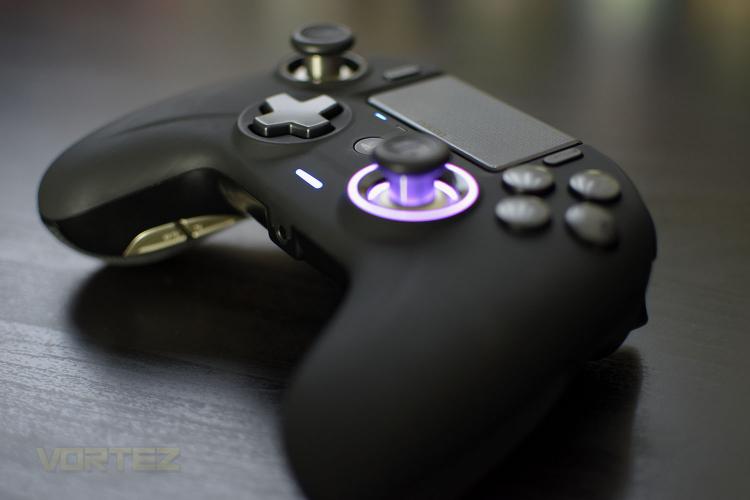
Now for the RGB lighting around the right analog stick; this is a bit of an odd one for us. It doesn’t really add anything to the controller, particularly with it only illuminating one thumbstick and not both, and the LEDs colours are far too washed out and pale to really give the controller any appeal. The effects also aren’t smooth and don’t blend together nicely, due to there only being 4 LEDs. All things considered; we can’t help but think the controller would’ve been better off without them instead of a half-baked attempt.
Battery life, while using the device with vibration set at 50% and with the RGB LEDs turned on, we got about 17-20 hours from one charge. We’ve been testing the pad for a while so have had chance to go through a few cycles now.
Overall, in all other aspects, aside from a mushy d-pad, the controller feels nothing short of fantastic.
When it comes to using the controller on the PS4, as we mentioned, you need a PC to sort out your profiles but then you can crack on and enjoy your games. The 3-metre braided cable means you can sit a decent distance away from your console while charging the controller, if you need to, however with up to 20 hours of battery life you should be good for even the most hardcore of gaming sessions.
The controller isn’t perfect on the PlayStation though, it’s not possible to turn the PS4 on remotely with the controller set up wirelessly, and if you don’t have a PS4 Pro with a USB port on the back, you need to plug in the ugly USB adaptor into the front of your console which is far from ideal but it does get around the issue with third party wireless controllers not being able to send/receive a headset/microphone signal on the PS4’s built-in wireless module.
The first thing we did was fire up a fast-paced game, Rocket League, to see how it felt for latency and overall usefulness. Immediately, it was noticed how positive everything felt, action buttons, the triggers on the back, the shoulder buttons, everything felt meaty and well-engineered, a stark contrast to our experience on the previous page. Before we knew what was going on, we found ourselves several games deep, throwing the virtual car about like never before, the gamepad is a dream to use in its standard form. But then, it gets better, being able to swap the collars on the thumbsticks, as well as the heads, can give the controller a vastly different feel in particular situations. Much more so than other “customisable” controller that we’ve used in the past.
For example, putting the thickest collar onto the right analog stick in Rocket League limited the turn speed of the camera making it far more usable. This could be done in software, of course, but something about the hardware limitation just felt better. Installing that same collar onto the left analog stick made racing games, particularly track-based simulation ones, just nicer. Assetto Corsa Competizione was our game of choice for this, a racing-sim that requires quite a lot of finesse and smooth inputs to really excel with a controller and let me tell you, that thicker collar made things vastly easier, almost to the point where I’d leave the steering wheel in the corner and use a controller. It made an unbelievable difference.
We then played about with the weight tweaking system, allowing you to put 10g, 14g or 16g in each side, or leave it empty. Honestly, this feels like a total gimmick – it’s a nice idea but it doesn’t really adjust how the pad sits in your hands or how it feels, unlike a weighted mouse.
The soft-touch rubber coating on the front and grippy handles round the back were excellent for long stints of use, giving actual genuine traction even with sweaty hands (which I suffer from a lot when gaming). It’s comfortable to use for long periods thanks to it’s large size but the best part of the design is the additional buttons on the back. On other controllers, these can often get in the way and prevent you from holding the controller “properly”, thanks to NACON’s clever thinking, they’ve made these buttons flush with the overall structure.
Now for the RGB lighting around the right analog stick; this is a bit of an odd one for us. It doesn’t really add anything to the controller, particularly with it only illuminating one thumbstick and not both, and the LEDs colours are far too washed out and pale to really give the controller any appeal. The effects also aren’t smooth and don’t blend together nicely, due to there only being 4 LEDs. All things considered; we can’t help but think the controller would’ve been better off without them instead of a half-baked attempt.
Battery life, while using the device with vibration set at 50% and with the RGB LEDs turned on, we got about 17-20 hours from one charge. We’ve been testing the pad for a while so have had chance to go through a few cycles now.
Overall, in all other aspects, aside from a mushy d-pad, the controller feels nothing short of fantastic.
When it comes to using the controller on the PS4, as we mentioned, you need a PC to sort out your profiles but then you can crack on and enjoy your games. The 3-metre braided cable means you can sit a decent distance away from your console while charging the controller, if you need to, however with up to 20 hours of battery life you should be good for even the most hardcore of gaming sessions.
The controller isn’t perfect on the PlayStation though, it’s not possible to turn the PS4 on remotely with the controller set up wirelessly, and if you don’t have a PS4 Pro with a USB port on the back, you need to plug in the ugly USB adaptor into the front of your console which is far from ideal but it does get around the issue with third party wireless controllers not being able to send/receive a headset/microphone signal on the PS4’s built-in wireless module.


