
Installing the Slider X600 was very simple. All I had to do was install the drivers and software on my computer and plug the mouse into a spare USB port. The Nova Slider X600 software is very easy to use, so configuring the buttons is straight-forward. The GUI on the software could be improved but as this is Nova's first edition I'm sure the software will improve if they continue to produce mice or peripherals that include driver software.
Testing
To test the Slider X600 as with other gaming peripherals, I put it through its paces with some heavy gaming sessions. Taking into consideration - button placement, overall comfort, precision and durability.
The games tested with the X600 were:
Crysis
Dead Space
Command & Conquer Red Alert 3
Three completely different game styles. Which I think really tests the mouse in different gaming environments. This should give me a fair conclusion. I also examined the mouse under standard usage in applications in and around the operating system environment – including web browsing. It's important to note though that although this review is giving an in-depth analysis of this mouse, it is very much down to personal preference whether you will find the mouse suitable for your needs. If at all possible, try testing out mice before you go ahead with the purchase to avoid disappointment.
The Slider X600 is a fantastic mouse, it feels and performs extremely well. What I especially like is the subtle but noticeable adjustments over the standard layout of the mouse. It coped with all three games remarkably well, the software gave me the ability to assign the buttons I wanted and I could even change the sensitivity on the fly – using the two buttons on the top of the mouse.
The glide from the Slider X600 is fluent and it moves well on most surfaces, the feet on the Slider X600 work very well and make for a very smooth operation. I found that in Crysis especially the accuracy of the Slider X600 excelled, enhancing the gaming experience.
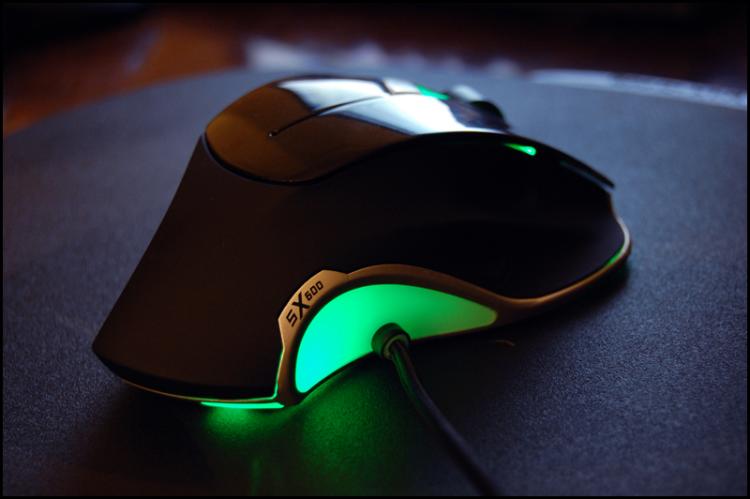
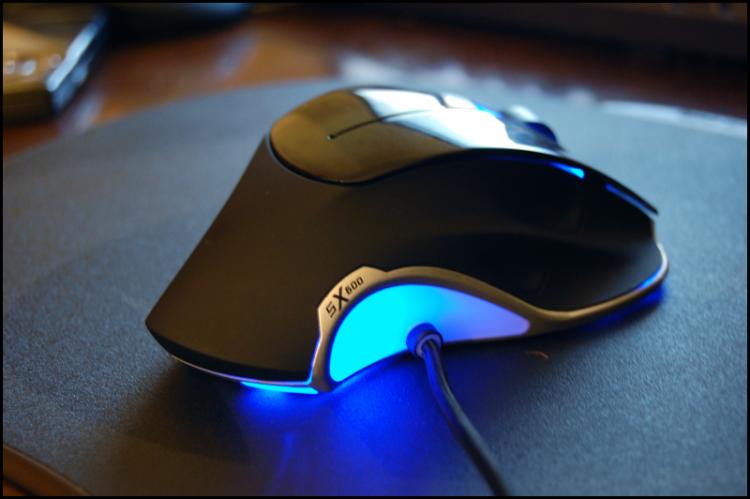
The button placement could be slightly improved. The button closest to the pad seems to be quite odd and feels uncomfortable. Apart from this the Slider X600 looks and feels great, the combination of materials used have been meticulously designed. You can tell that there has been some brilliant design ideas conceived. I especially like the ability to change the colour of the mouse, customising it between 5 different colours. You can do this by hitting a button on the top of the mouse. This is a superb idea, it means for example that if you have a green lighting setup inside your case you can adjust the mouse to suit or any of the other colours. The glow off the Slider X600 is atmospheric and it gives your desk that gaming feel. The other thing that I like is the cable which comes out the side instead of from the front. As mentioned earlier, these small changes move away from the standard format your mouse would typically come in and it adds some nice styling to the peripheral.

Conclusion
In conclusion, I found the Nova Slider X600 an exceptional mouse. It was a pleasure to work with, it did take some getting used to due to the difference in shape over my Logitech MX-518 but after some time I got used to the mouse and It was fun to use.
You can certainly tell that Nova have worked along-side the gamer when designing this mouse, the design ideas clearly show some great decision making and conception. The Slider X600 handled all the games I tested very well – a combination of smooth glide and accurate aim aids your gaming sessions.
The Slider X600 is priced around the £65 mark which some might consider to be quite hefty for a mouse. This is the only issue I really have with this mouse, indeed it presented in an impressive fashion with some wonderful innovation, offering high-end performance but there are mice out there cheaper that offer similar performance. There is no doubt though, this mouse is premium and I would highly recommend it.
I would like to thank Nova for supplying us with the Slider X600.


Testing
To test the Slider X600 as with other gaming peripherals, I put it through its paces with some heavy gaming sessions. Taking into consideration - button placement, overall comfort, precision and durability.
The games tested with the X600 were:
Crysis
Dead Space
Command & Conquer Red Alert 3
Three completely different game styles. Which I think really tests the mouse in different gaming environments. This should give me a fair conclusion. I also examined the mouse under standard usage in applications in and around the operating system environment – including web browsing. It's important to note though that although this review is giving an in-depth analysis of this mouse, it is very much down to personal preference whether you will find the mouse suitable for your needs. If at all possible, try testing out mice before you go ahead with the purchase to avoid disappointment.
The Slider X600 is a fantastic mouse, it feels and performs extremely well. What I especially like is the subtle but noticeable adjustments over the standard layout of the mouse. It coped with all three games remarkably well, the software gave me the ability to assign the buttons I wanted and I could even change the sensitivity on the fly – using the two buttons on the top of the mouse.
The glide from the Slider X600 is fluent and it moves well on most surfaces, the feet on the Slider X600 work very well and make for a very smooth operation. I found that in Crysis especially the accuracy of the Slider X600 excelled, enhancing the gaming experience.
The button placement could be slightly improved. The button closest to the pad seems to be quite odd and feels uncomfortable. Apart from this the Slider X600 looks and feels great, the combination of materials used have been meticulously designed. You can tell that there has been some brilliant design ideas conceived. I especially like the ability to change the colour of the mouse, customising it between 5 different colours. You can do this by hitting a button on the top of the mouse. This is a superb idea, it means for example that if you have a green lighting setup inside your case you can adjust the mouse to suit or any of the other colours. The glow off the Slider X600 is atmospheric and it gives your desk that gaming feel. The other thing that I like is the cable which comes out the side instead of from the front. As mentioned earlier, these small changes move away from the standard format your mouse would typically come in and it adds some nice styling to the peripheral.
Conclusion
In conclusion, I found the Nova Slider X600 an exceptional mouse. It was a pleasure to work with, it did take some getting used to due to the difference in shape over my Logitech MX-518 but after some time I got used to the mouse and It was fun to use.
You can certainly tell that Nova have worked along-side the gamer when designing this mouse, the design ideas clearly show some great decision making and conception. The Slider X600 handled all the games I tested very well – a combination of smooth glide and accurate aim aids your gaming sessions.
The Slider X600 is priced around the £65 mark which some might consider to be quite hefty for a mouse. This is the only issue I really have with this mouse, indeed it presented in an impressive fashion with some wonderful innovation, offering high-end performance but there are mice out there cheaper that offer similar performance. There is no doubt though, this mouse is premium and I would highly recommend it.
I would like to thank Nova for supplying us with the Slider X600.


