
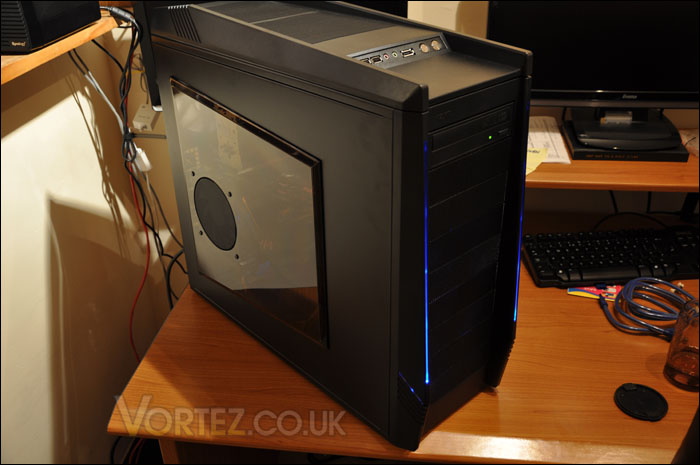
When it comes to testing with a case, the only results that we can look for is the thermal performance. With the NZXT Tempest EVO having a multitude fans, what we want to find out is how well do these fans cool our system and are they noisy? The components I have chosen to install inside the Tempest EVO are new, and because of this these parts have never been installed in another case so we aren’t able to compare any temperatures against other cases with the same components unfortunately. But still, the results will give you an indication of thermal performance.
System Components
Processor AMD X6 1055T 2.8GHz
MotherboardASUS M4A89TD PRO AM3
Memory 4GB Mushkin 10666 9-9-9-24 DDR3
Graphics Card MSI 8800GTX 869MB
Hard Disk x2 Samsung SATA-II 300GB
The below temperatures were obtained by reporting thermal results at idle (20 minutes into Windows 7 from cold boot) and then loading the system with Battlefield Bad Company 2 for just over 30 minutes.
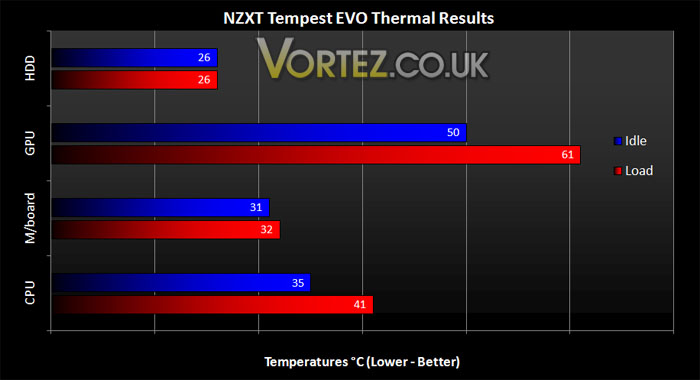
The above results are certainly encouraging. For a system of such calibre to remain comfortably low this is positive. Airflow inside a case is essential if you want to reduce system temperatures and with six case fans spinning the Tempest EVO is undoubtedly up to the challenge.
Sound
The noise from this case becomes a bit of an issue if you choose to use all six fans, what would be nice to see is some sort of fan control which I’m afraid to say is absent. With half of the fans switched off the noise levels are much better and funnily enough it doesn’t impede temperatures that much.
What I would suggest is turning off the side and top fans if the noise is particularly affecting things.
System Components
Processor AMD X6 1055T 2.8GHz
MotherboardASUS M4A89TD PRO AM3
Memory 4GB Mushkin 10666 9-9-9-24 DDR3
Graphics Card MSI 8800GTX 869MB
Hard Disk x2 Samsung SATA-II 300GB
The below temperatures were obtained by reporting thermal results at idle (20 minutes into Windows 7 from cold boot) and then loading the system with Battlefield Bad Company 2 for just over 30 minutes.
The above results are certainly encouraging. For a system of such calibre to remain comfortably low this is positive. Airflow inside a case is essential if you want to reduce system temperatures and with six case fans spinning the Tempest EVO is undoubtedly up to the challenge.
Sound
The noise from this case becomes a bit of an issue if you choose to use all six fans, what would be nice to see is some sort of fan control which I’m afraid to say is absent. With half of the fans switched off the noise levels are much better and funnily enough it doesn’t impede temperatures that much.
What I would suggest is turning off the side and top fans if the noise is particularly affecting things.


