
In regards to drivers, the OCZ Behemoth uses a generic Microsoft driver included in Windows. It is recognized as a HID-compliant mouse. The lack of requiring a special driver is great, because it renders the Behemoth compatible with any computer system with a Windows operating system.
The driver mini-CD included with the Behemoth includes a simple 10.8MB executable: Behemoth.exe (version 2.8.2.1). The version of the executable is the same as the one found on OCZ Technology's website:
Link: OCZ Behemoth Driver Page
The executable requires no setup, and simply runs off the bat. The GUI of the software is very simple and a minimum of text is used. Several arrows are located on the first screen of the software. Although it may be confusing at first, the arrows are very straight-forward and they simply indicate where the profile should be loaded: either into to mouse's onboard memory, into detail, or as a file (extension: .pf4) that can be saved onto the computer.
In total, the mouse can hold four different profiles. The first is the non-customizable profile that is preconfigured by OCZ Technology: the side buttons are configured as forward and backwards, and the other buttons have standard functions. Three customizable profiles may be saved onto the mouse's on-board memory. In total, six buttons may be customized, and the buttons that cannot be customized are the left button and the DPI switcher button.

The right button (R-Button), scroll wheel button (M-button), the left side button (Button-4), and the right side button (Button-5) are highly customizable. Each function that the buttons may have is very handy and works well. The list of functions that these buttons may have is the following:
1. Keyboard: Emulates keystrokes
2. Emulate Hid: Hotkey to Web Browser, E-Mail, Media Player, Play/Pause, Stop, Next Track, Previous Track, Volume Up, Volume Down, Mute, Calculator, or My Computer
3. Keyshot (Mouse) : Emulates L-Button, R-Button, M-Button, Button-4, or Button-5
a. Keyshot up to 255 times until deactivation
b. Fast, Medium or Slow mode (time between each keyshot)
4. Keyshot (Keyboard) : Emulates a single keystroke
a. Keyshot up to 255 times until deactivation
b. Fast, Medium or Slow mode (time between each keyshot)
5. Macro (124 Bytes) (up to 21 keystrokes): Records a set of keystrokes
a. 3 modes: Fire (one keyshot per click), Loop (endless keyshots until another click), and Keep Firing (endless keyshots until release of button)
6. 4 Scripts (256 Bytes) (up to 43 keystrokes) and 2 Scripts (512 Byte) : (up to 86 keystrokes): Records a set of keystrokes
a. 3 modes: Fire (one keyshot per click), Loop (endless keyshots until another click), and Keep Firing (endless keyshots until release of button)
7. DPI (+) and DPI (-): one direction DPI switching
8. Cyclic DPI (+) and Cyclic DPI (-): one direction DPI switching with cycling
9. L-Button, R-Button, M-Button, Button-4, Button-5
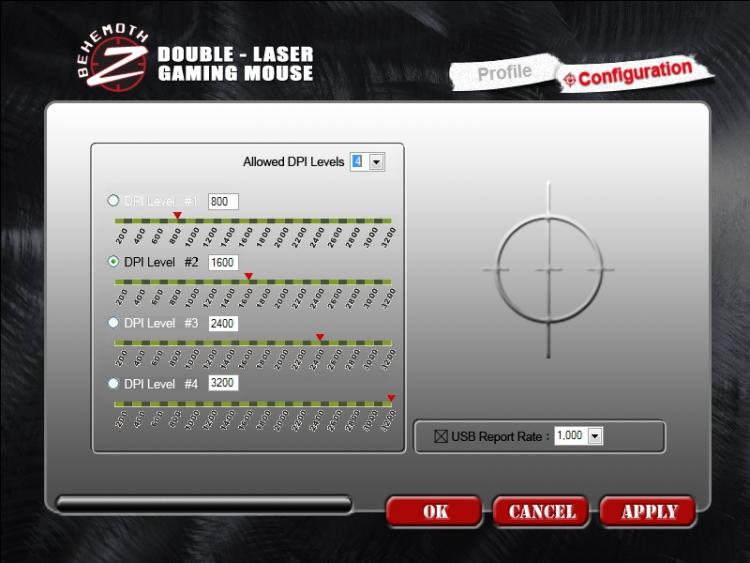
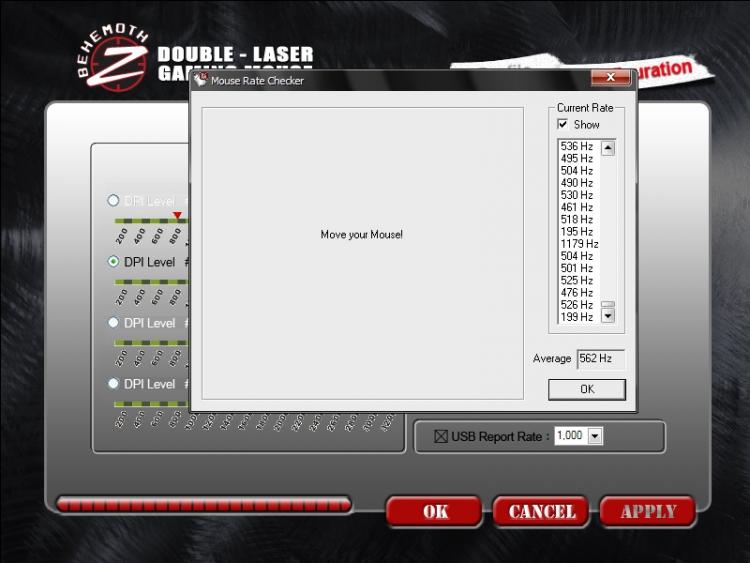
Under the "Configuration" tab, 4 different DPI modes can be assigned that range from 100 to 3200 dpi. These 4 dpi modes apply to all 4 profiles. There is also a setting to configure the polling rate of the USB port as 125, 250, 500 or 1000 Hz. A higher polling rate increases the mouse's responsiveness. Attaining 1000 Hz with this mouse was highly difficult, however. It is not unknown whether the software could not properly configure the mouse to 1000 Hz or my hand was not quick enough to make such a setting noticeable in Mouse Rate Checker, which noted an average polling rate of 562 Hz.

Without a doubt, given its 3 customizable profiles and the extensive functions assignable to buttons, the OCZ Behemoth offers endless customization under its hood, which will please any kind of users. Furthermore, with its onboard memory, the Behemoth is ideal for those that carry their mouse from one computer system to another. Not requiring any special software or drivers to be installed on the host computer, the Behemoth allows users rejoice from their custom keys instantly, and to give them an edge during a quick game with friends.
The driver mini-CD included with the Behemoth includes a simple 10.8MB executable: Behemoth.exe (version 2.8.2.1). The version of the executable is the same as the one found on OCZ Technology's website:
Link: OCZ Behemoth Driver Page
The executable requires no setup, and simply runs off the bat. The GUI of the software is very simple and a minimum of text is used. Several arrows are located on the first screen of the software. Although it may be confusing at first, the arrows are very straight-forward and they simply indicate where the profile should be loaded: either into to mouse's onboard memory, into detail, or as a file (extension: .pf4) that can be saved onto the computer.
In total, the mouse can hold four different profiles. The first is the non-customizable profile that is preconfigured by OCZ Technology: the side buttons are configured as forward and backwards, and the other buttons have standard functions. Three customizable profiles may be saved onto the mouse's on-board memory. In total, six buttons may be customized, and the buttons that cannot be customized are the left button and the DPI switcher button.
The right button (R-Button), scroll wheel button (M-button), the left side button (Button-4), and the right side button (Button-5) are highly customizable. Each function that the buttons may have is very handy and works well. The list of functions that these buttons may have is the following:
1. Keyboard: Emulates keystrokes
2. Emulate Hid: Hotkey to Web Browser, E-Mail, Media Player, Play/Pause, Stop, Next Track, Previous Track, Volume Up, Volume Down, Mute, Calculator, or My Computer
3. Keyshot (Mouse) : Emulates L-Button, R-Button, M-Button, Button-4, or Button-5
a. Keyshot up to 255 times until deactivation
b. Fast, Medium or Slow mode (time between each keyshot)
4. Keyshot (Keyboard) : Emulates a single keystroke
a. Keyshot up to 255 times until deactivation
b. Fast, Medium or Slow mode (time between each keyshot)
5. Macro (124 Bytes) (up to 21 keystrokes): Records a set of keystrokes
a. 3 modes: Fire (one keyshot per click), Loop (endless keyshots until another click), and Keep Firing (endless keyshots until release of button)
6. 4 Scripts (256 Bytes) (up to 43 keystrokes) and 2 Scripts (512 Byte) : (up to 86 keystrokes): Records a set of keystrokes
a. 3 modes: Fire (one keyshot per click), Loop (endless keyshots until another click), and Keep Firing (endless keyshots until release of button)
7. DPI (+) and DPI (-): one direction DPI switching
8. Cyclic DPI (+) and Cyclic DPI (-): one direction DPI switching with cycling
9. L-Button, R-Button, M-Button, Button-4, Button-5
Under the "Configuration" tab, 4 different DPI modes can be assigned that range from 100 to 3200 dpi. These 4 dpi modes apply to all 4 profiles. There is also a setting to configure the polling rate of the USB port as 125, 250, 500 or 1000 Hz. A higher polling rate increases the mouse's responsiveness. Attaining 1000 Hz with this mouse was highly difficult, however. It is not unknown whether the software could not properly configure the mouse to 1000 Hz or my hand was not quick enough to make such a setting noticeable in Mouse Rate Checker, which noted an average polling rate of 562 Hz.
Without a doubt, given its 3 customizable profiles and the extensive functions assignable to buttons, the OCZ Behemoth offers endless customization under its hood, which will please any kind of users. Furthermore, with its onboard memory, the Behemoth is ideal for those that carry their mouse from one computer system to another. Not requiring any special software or drivers to be installed on the host computer, the Behemoth allows users rejoice from their custom keys instantly, and to give them an edge during a quick game with friends.


