
Mouse Surfaces
The Razer Abyssus Mirror was tested on various surfaces including a cloth mousepad (QPAD|UC Large), wood, granite, carpet and glass.
The mouse’s tracking worked perfectly fine on a cloth mousepad, wood, granite and carpet. The infrared sensor did not work at all on a glass surface, unfortunately.
The three Teflon mouse feet of the Razer Abyssus Mirror glided across each of these surfaces with ease except for the granite because of the latter’s grainy and rugged surface. The mouse feet of a mouse are essential to the overall quality of the mouse. I am glad that Razer did not skim on them and they provided quality Teflon feet.
Ergonomics, Grip and Buttons
There are three common ways to hold a mouse: the palm grip, the claw grip and the fingertip grip. Each of these grips has advantages and disadvantages in terms of comfort and overall control of the mouse’s movement. Palm grip is probably the most popular grip, mostly because it is highly comfortable even after long-term usage of the mouse. The claw grip provides great control over the mouse’s movement while sacrificing long-term comfort. The fingertip grip can be said to be a compromise between these two previously mentioned grips. In the fingertip grip, only the tip of the five fingers touches the mouse. Therefore, mouse movements are controlled by the fingers, giving a better control of the mouse. For more information on these grips, feel free to read Razer’s excellent explanation on this topic.
Razer’s Explanation of Mouse Grips: Frintertip Grip
As for the Razer Abyssus Mirror, the company designed this mouse to accommodate the fingertip grip, i.e. it is small and has a low-profile. Razer has done a very good job because each fingertip has a specific spot on the mouse where it can rest upon and grip the mouse comfortably and firmly.
Some users might find the mouse to be too light. The problem becomes more important because the Abyssus Mirror does not have a weight system. Personally, I found the weight of the mouse adequate for good movement control while using a fingertip grip.
Although the Abyssus Mirror works best with the fingertip grip, the palm grip is also possible and it is a comfortable grip style to use, especially in non-gaming situations. The claw grip is also possible, but it is very uncomfortable because the mouse is not long enough. Therefore, the pit of the hand will not touch the back of the mouse without unnaturally bending the fingers.
When the Abyssus Mirror is powered, the Razer logo will glow blue. This light is very faint and it will not blind the user nor will it be able to light up a room. Razer has done a good job on the intensity of the light.
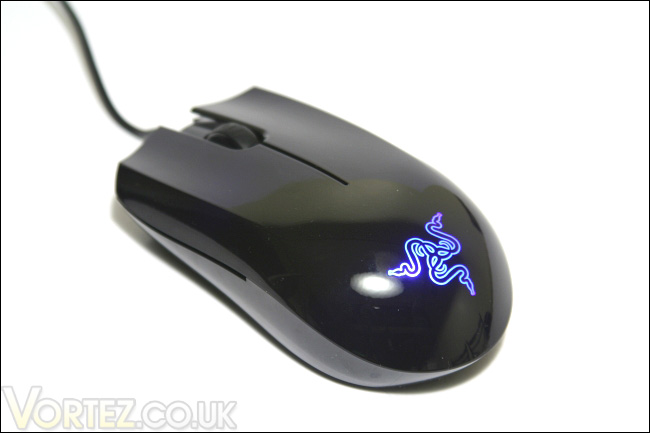
The Razer Abyssus Mirror powered with the blue glowing Razer logo
Recall that the Razer Abyssus Mirror has three buttons. The left and right buttons are easily depressed. Both buttons give a very light clicking sound and smooth tactile feedback. The middle button also has the same noise and tactile feedback characteristics. The scroll wheel provides a good tactile feedback and a soft thudding sound. However, if the scroll wheel is spun upwards without lightly depressing the button, it will give you a loud clicking sound. This loud clunking sound moves away from the overall quality of the product and it honestly makes the scroll wheel sound cheaply made.
Gaming
Neverwinter Nights 2
From Atari’s Neverwinter Nights 2 website: Link
Neverwinter Nights 2, in a nutshell, is a role-playing game that is immersive and fun to play. Playing the game for many hours non-stop is my new hobby. Fast mouse movement is not necessary when playing this game, but a long-term comfort is primordial to keep the gaming experience pleasant.
When I played Neverwinter Nights 2, I adopted a palm grip that the Abyssus Mirror accommodated without problem. Comfort was maintained and control was not loss. Even after many hours of usage, I did not have any pain or aches in my right arm. The high gloss finish of the Abyssus Mirror was also quite welcomed. The smoothness of the finish was pleasant but it did not make the surface slippery. At times I found myself caressing the mouse.
Unreal Tournament 2004
From Epic Games’ Unreal Tournament 2004’s website: Link
Unreal Tournament 2004, like Quake, is your typical twitch game where you are required to move the cursor at furiously high speeds in various directions to stay in the game. The fingertip grip or the claw grip is a must for optimal gaming performance. The Razer Abyssus Mirror was very comfortable with the fingertip grip, but I noticed that I transitioned between the fingertip grip and the palm grip quite frequently. The Abyssus Mirror did not mind, however, and either grip felt natural.
Responsiveness of the mouse was excellent, and the 1000 Hz polling rate was highly welcomed. The DPI switch was more or less used by me. The main problem with the DPI switch is that it is at the bottom of the mouse, which makes DPI adjustment more or less convenient in a fast-paced game like Unreal Tournament 2004.
Normal Usage
In various non-gaming Windows applications, I adopted both a fingertip grip and a palm grip with the Razer Abyssus Mirror. Again, both grips were comfortable. I found that the absence of drift control in the Abyssus Mirror quite useful with image editing, such as when selecting an area of an image to the pixel. Normally, drift control would interfere with my precision cursor movements by wrongly correcting them as straight lines. The Razer Abyssus Mirror performed admirably in these situations, but I think a mechanical switch to enable or disable the drift control could have been a neat feature to have on the mouse.
The on-the-fly sensitivity control (after configuring with the software) was quite handy in situations such as image editing where small cursor movements were needed.
I am fond of ergonomic-type mouse with a design that specifically accommodates right or left handed users. Gripping these kinds of mice usually feel very natural. Before testing the mouse, I was sceptical about the overall comfort of the Razer Abyssus Mirror, considering my more or less good experience with ambidextrous mice (NZXT Avatar: Review at Vortez Hardware) . Nevertheless, the Abyssus Mirror exceeded my expectations by being one of the more comfortable and responsive ambidextrous mice I have used to date. Indeed, gripping the mouse felt very natural because of its low-profile. As such, the hand stayed in a neutral position with fingers only lightly flexed. I can now safely say that even ambidextrous mice can be ergonomic.
I did find, however, that because of its low-profile, the bottom of my palm would sometimes rub against my mouse pad. This was easily solved by having my thumb grip against the outside edge of the left button instead of gripping the bottom left side of the mouse.
The Razer Abyssus Mirror was tested on various surfaces including a cloth mousepad (QPAD|UC Large), wood, granite, carpet and glass.
The mouse’s tracking worked perfectly fine on a cloth mousepad, wood, granite and carpet. The infrared sensor did not work at all on a glass surface, unfortunately.
The three Teflon mouse feet of the Razer Abyssus Mirror glided across each of these surfaces with ease except for the granite because of the latter’s grainy and rugged surface. The mouse feet of a mouse are essential to the overall quality of the mouse. I am glad that Razer did not skim on them and they provided quality Teflon feet.
Ergonomics, Grip and Buttons
There are three common ways to hold a mouse: the palm grip, the claw grip and the fingertip grip. Each of these grips has advantages and disadvantages in terms of comfort and overall control of the mouse’s movement. Palm grip is probably the most popular grip, mostly because it is highly comfortable even after long-term usage of the mouse. The claw grip provides great control over the mouse’s movement while sacrificing long-term comfort. The fingertip grip can be said to be a compromise between these two previously mentioned grips. In the fingertip grip, only the tip of the five fingers touches the mouse. Therefore, mouse movements are controlled by the fingers, giving a better control of the mouse. For more information on these grips, feel free to read Razer’s excellent explanation on this topic.
Razer’s Explanation of Mouse Grips: Frintertip Grip
As for the Razer Abyssus Mirror, the company designed this mouse to accommodate the fingertip grip, i.e. it is small and has a low-profile. Razer has done a very good job because each fingertip has a specific spot on the mouse where it can rest upon and grip the mouse comfortably and firmly.
Some users might find the mouse to be too light. The problem becomes more important because the Abyssus Mirror does not have a weight system. Personally, I found the weight of the mouse adequate for good movement control while using a fingertip grip.
Although the Abyssus Mirror works best with the fingertip grip, the palm grip is also possible and it is a comfortable grip style to use, especially in non-gaming situations. The claw grip is also possible, but it is very uncomfortable because the mouse is not long enough. Therefore, the pit of the hand will not touch the back of the mouse without unnaturally bending the fingers.
When the Abyssus Mirror is powered, the Razer logo will glow blue. This light is very faint and it will not blind the user nor will it be able to light up a room. Razer has done a good job on the intensity of the light.
The Razer Abyssus Mirror powered with the blue glowing Razer logo
Recall that the Razer Abyssus Mirror has three buttons. The left and right buttons are easily depressed. Both buttons give a very light clicking sound and smooth tactile feedback. The middle button also has the same noise and tactile feedback characteristics. The scroll wheel provides a good tactile feedback and a soft thudding sound. However, if the scroll wheel is spun upwards without lightly depressing the button, it will give you a loud clicking sound. This loud clunking sound moves away from the overall quality of the product and it honestly makes the scroll wheel sound cheaply made.
Gaming
Neverwinter Nights 2
From Atari’s Neverwinter Nights 2 website: Link
Neverwinter Nights 2 (NWN2) is a computer role-playing game set in the fantasy world of the Forgotten Realms, one of the popular campaign settings of Dungeons and Dragons. It takes the player from the tiniest of villages into a sweeping tale of danger and war, chronicling their rise from a peasant to a full-fledged hero of the Realms, defending it against one of the greatest threats of the age.
Neverwinter Nights 2, in a nutshell, is a role-playing game that is immersive and fun to play. Playing the game for many hours non-stop is my new hobby. Fast mouse movement is not necessary when playing this game, but a long-term comfort is primordial to keep the gaming experience pleasant.
When I played Neverwinter Nights 2, I adopted a palm grip that the Abyssus Mirror accommodated without problem. Comfort was maintained and control was not loss. Even after many hours of usage, I did not have any pain or aches in my right arm. The high gloss finish of the Abyssus Mirror was also quite welcomed. The smoothness of the finish was pleasant but it did not make the surface slippery. At times I found myself caressing the mouse.
Unreal Tournament 2004
From Epic Games’ Unreal Tournament 2004’s website: Link
Unreal Tournament 2004 is a multiplayer first person shooter that combines the kill-or-be-killed experience of gladiatorial combat with cutting-edge technology. Ten game modes - both team-based and "every man for himself" -- provide even the most hardcore gamer with palm-sweating challenges through unbelievably detailed indoor arenas and vast outdoor environments. As the ultimate techno-gladiator of the future, players will take their fates into their hands, battling against up to 32 other players online in action-packed, frag-filled arenas.
Unreal Tournament 2004, like Quake, is your typical twitch game where you are required to move the cursor at furiously high speeds in various directions to stay in the game. The fingertip grip or the claw grip is a must for optimal gaming performance. The Razer Abyssus Mirror was very comfortable with the fingertip grip, but I noticed that I transitioned between the fingertip grip and the palm grip quite frequently. The Abyssus Mirror did not mind, however, and either grip felt natural.
Responsiveness of the mouse was excellent, and the 1000 Hz polling rate was highly welcomed. The DPI switch was more or less used by me. The main problem with the DPI switch is that it is at the bottom of the mouse, which makes DPI adjustment more or less convenient in a fast-paced game like Unreal Tournament 2004.
Normal Usage
In various non-gaming Windows applications, I adopted both a fingertip grip and a palm grip with the Razer Abyssus Mirror. Again, both grips were comfortable. I found that the absence of drift control in the Abyssus Mirror quite useful with image editing, such as when selecting an area of an image to the pixel. Normally, drift control would interfere with my precision cursor movements by wrongly correcting them as straight lines. The Razer Abyssus Mirror performed admirably in these situations, but I think a mechanical switch to enable or disable the drift control could have been a neat feature to have on the mouse.
The on-the-fly sensitivity control (after configuring with the software) was quite handy in situations such as image editing where small cursor movements were needed.
I am fond of ergonomic-type mouse with a design that specifically accommodates right or left handed users. Gripping these kinds of mice usually feel very natural. Before testing the mouse, I was sceptical about the overall comfort of the Razer Abyssus Mirror, considering my more or less good experience with ambidextrous mice (NZXT Avatar: Review at Vortez Hardware) . Nevertheless, the Abyssus Mirror exceeded my expectations by being one of the more comfortable and responsive ambidextrous mice I have used to date. Indeed, gripping the mouse felt very natural because of its low-profile. As such, the hand stayed in a neutral position with fingers only lightly flexed. I can now safely say that even ambidextrous mice can be ergonomic.
I did find, however, that because of its low-profile, the bottom of my palm would sometimes rub against my mouse pad. This was easily solved by having my thumb grip against the outside edge of the left button instead of gripping the bottom left side of the mouse.


