
There's no hard and fast test for determining whether or not any gaming peripheral is better than the rest. But to provide you with some quality feedback I will be using the keyboard over 2 whole days, using as many of the keys as I possibly can both in Windows and in-game.
Windows based tasks
The ROCCAT Arvo being so compact gives the impression you do have plenty of space on the desk. The layout of the keyboard as already mentioned remains unhindered and so each of the tasks that I undertook with the Arvo were painless. I used this keyboard in web browsers, typing to friends using Windows Live Messenger, and amongst other applications and tasks to actually write this review. Typing is fast and comfortable, the transition from numpad to gaming mode can put you in a bit of a spin at times especially if you use the arrow keys to navigate folders or even web pages. But like with many things, once you have used the Arvo for a few hours it becomes second nature. I programmed a few of the thumbster keys (using the software below) to functions such as opening up my default browser to my homepage, again this is easy and gives the whole windows experience additional functionality.
Gaming
With the Arvo being a gaming keyboard, its only fair that we give it a run through on a game or two. To test out the ROCCAT Arvo I spent many hours in Call of Duty Modern Warfare 2. As with the previous Windows testing, the Arvo takes on gaming tasks with ease, because its compact it allows you to get into better position with the mouse and have greater control. What I like most of all though is the ability to use those thumbster buttons below the spacebar. As ROCCAT suggest, they give your thumb something more to do!! I assigned a few commands as I describe below, and this gives me more control inside the game. A clear winner.
Software
Bundled with the Arvo is a Driver CD containing software that allows you to customize the 5 programmable buttons on the keyboard. Using the software is quite easy and the program itself is fairly lightweight and small enough to not cause any problems.
There are preset macros that have already been setup for popular games such as WoW and Crysis. I don't actually play any of these games frequently enough to use those macros. The only game I'm seriously playing at the moment is Call of Duty Modern Warfare 2 and since this isn't in the list, to use the thumbster buttons I will need to create a new macro. But since the software allows me to do this easily, its no painstaking task.
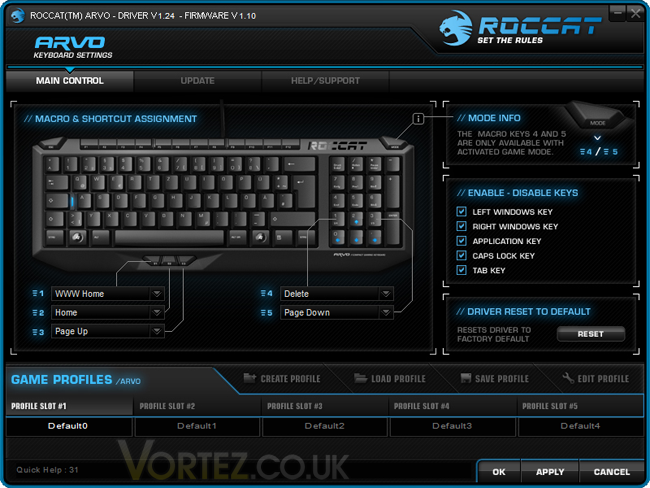
To create a new macro I just had to load up Modern Warfare 2and ensure the Arvo software is running the background. When the game has loaded, I just have to make sure I'm actually taking part in a mission or on a multiplayer server and then if I ALT + Tab back to the Arvo software and click create new macro, record, jump back in game and I just need to perform the action, close the game down, go back to the Arvo software stop the record and edit all the other keystrokes that are unnecessary out. It sounds like a lot of steps but really it isn't. It took me all of 2 minutes to create the macro, I assign the thumbster button #1 to throw a stun grenade. This is actually really handy for Modern Warfare 2, assigning a key to a killstreak command would be very useful.
Windows based tasks
The ROCCAT Arvo being so compact gives the impression you do have plenty of space on the desk. The layout of the keyboard as already mentioned remains unhindered and so each of the tasks that I undertook with the Arvo were painless. I used this keyboard in web browsers, typing to friends using Windows Live Messenger, and amongst other applications and tasks to actually write this review. Typing is fast and comfortable, the transition from numpad to gaming mode can put you in a bit of a spin at times especially if you use the arrow keys to navigate folders or even web pages. But like with many things, once you have used the Arvo for a few hours it becomes second nature. I programmed a few of the thumbster keys (using the software below) to functions such as opening up my default browser to my homepage, again this is easy and gives the whole windows experience additional functionality.
Gaming
With the Arvo being a gaming keyboard, its only fair that we give it a run through on a game or two. To test out the ROCCAT Arvo I spent many hours in Call of Duty Modern Warfare 2. As with the previous Windows testing, the Arvo takes on gaming tasks with ease, because its compact it allows you to get into better position with the mouse and have greater control. What I like most of all though is the ability to use those thumbster buttons below the spacebar. As ROCCAT suggest, they give your thumb something more to do!! I assigned a few commands as I describe below, and this gives me more control inside the game. A clear winner.
Software
Bundled with the Arvo is a Driver CD containing software that allows you to customize the 5 programmable buttons on the keyboard. Using the software is quite easy and the program itself is fairly lightweight and small enough to not cause any problems.
There are preset macros that have already been setup for popular games such as WoW and Crysis. I don't actually play any of these games frequently enough to use those macros. The only game I'm seriously playing at the moment is Call of Duty Modern Warfare 2 and since this isn't in the list, to use the thumbster buttons I will need to create a new macro. But since the software allows me to do this easily, its no painstaking task.
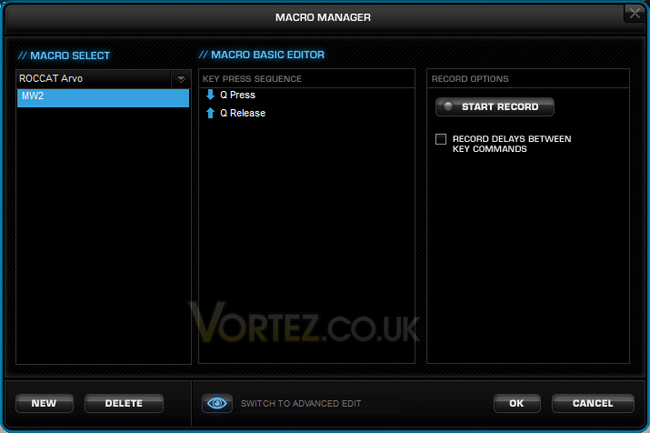
To create a new macro I just had to load up Modern Warfare 2and ensure the Arvo software is running the background. When the game has loaded, I just have to make sure I'm actually taking part in a mission or on a multiplayer server and then if I ALT + Tab back to the Arvo software and click create new macro, record, jump back in game and I just need to perform the action, close the game down, go back to the Arvo software stop the record and edit all the other keystrokes that are unnecessary out. It sounds like a lot of steps but really it isn't. It took me all of 2 minutes to create the macro, I assign the thumbster button #1 to throw a stun grenade. This is actually really handy for Modern Warfare 2, assigning a key to a killstreak command would be very useful.


