
The first time you fire up the Burst Pro Air, you’ll more than likely be blown away by how easily the mouse glides compared to whatever you’re replacing it with, the device moves around like nothing we’ve tested so far.
Setting things up, thanks to the ROCCAT SWARM software, is a piece of pie. There’s a firmware update to do on the mouse and dongle, but other than that, you’re good to go. Things are especially straight forward if you already own or use other ROCCAT peripherals as the AIMO lighting will immediately kick into action and extend the current lighting effects already on show.
In daily use, the mouse is great, no complaints at all. The thumbs buttons are where they should be, it’s comfortable to hold, the build feels good. Yep, no issues here. Perfectly good as working from home daily driver.
Moving onto gaming, where we can let the thing stretch its legs, we ran it through a couple of tests. Firstly we dialled in the DPI and sensitivity settings, getting things set up just as they should be, then we kicked off the gaming with a prolonged session on Borderlands 3, the lightweight design was lovely, genuinely lovely. Next up we loaded in War Thunder, a game where fine, prolonged controls are key to gunning down enemies; after getting my eye-in with the new mouse, the lightweight design began to pay dividends, allowing smooth and precise movements.
The 19,000 DPI Owl-Eye sensor, based on Pixart’s PAW3370, performed remarkably well on the whole. The mouse felt quite sluggish straight off the mark, requiring us to up the DPI counter and reduce the sensitivity but once we had everything set up, it was all go. We tested the mouse out on a fine cloth surface, a wooden desk and a coarse mouse mat, all three tracked without issue.
A new technology within the world of peripherals is optical switches, we’ve seen a few keyboards with this feature but it was always due to make its way over to mice as well. There are two main advantages to using optical switches, it removes the debounce delay, which is a processing method that removes multiple signals, but it takes a short period for this to happen; optical switches are also more reliable than traditional metal contacts. While I fully trust that the debounce delay is removed, and that helps to improve the overall latency of the device, I couldn’t tell the difference, even with a 165Hz display on a fast-paced game; having said that, it certainly can’t do any harm, and if you’re really serious about your gaming then you may well find it easier to notice the tiny difference. One thing I did notice, however, was the crispness of the clicks, they feel lovely with a very positive action.
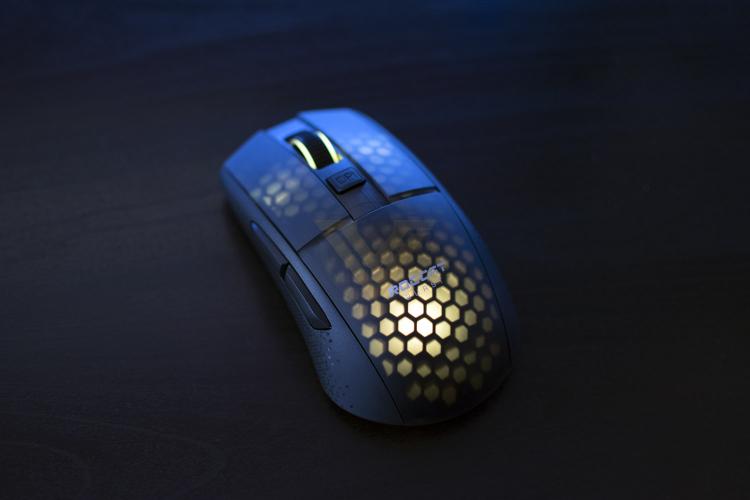
Build quality, as is to be expected from ROCCAT these days, is top-notch. Despite the incredibly thin plastic housing, structural rigidity is fine, they’ve found a clever way of using the honeycomb design underneath to keep things stiff while removing weight. There’s a small amount of flex from the thumb section (if you’re right handed) but nothing that would detract from things on a day to day basis. The scroll wheel is weighted just right, with a soft and quiet click so you’re not a nuisance to anyone else.
RGB lighting is quite unique here, with no actual “windows” built into the device, instead ROCCAT have machined the plastic chassis to be so thin that it becomes translucent. This is a very clever method, not only because it’s something new and fancy, but if you don’t like RGB lighting you can turn it off and there is absolutely no indication that there should be any lighting. Despite having to punch through the plastic housing, the lighting is still colourful and bright, the only noticeable problem here is the smoothness of the transitions, it’s very jumpy and ruins the effects somewhat.
Finally, onto battery life. We tested the mouse over about a two-week period and needed to charge it twice. We ran it with the RGB lighting the entire time, which will significantly effect the battery life, but it’s just too nice to turn off. Charging, though, really isn’t an issue, the paracord Type-C charging cable provides so little resistance that you could happily run it wired for 30 minutes while you build up a charge.
Setting things up, thanks to the ROCCAT SWARM software, is a piece of pie. There’s a firmware update to do on the mouse and dongle, but other than that, you’re good to go. Things are especially straight forward if you already own or use other ROCCAT peripherals as the AIMO lighting will immediately kick into action and extend the current lighting effects already on show.
In daily use, the mouse is great, no complaints at all. The thumbs buttons are where they should be, it’s comfortable to hold, the build feels good. Yep, no issues here. Perfectly good as working from home daily driver.
Moving onto gaming, where we can let the thing stretch its legs, we ran it through a couple of tests. Firstly we dialled in the DPI and sensitivity settings, getting things set up just as they should be, then we kicked off the gaming with a prolonged session on Borderlands 3, the lightweight design was lovely, genuinely lovely. Next up we loaded in War Thunder, a game where fine, prolonged controls are key to gunning down enemies; after getting my eye-in with the new mouse, the lightweight design began to pay dividends, allowing smooth and precise movements.
The 19,000 DPI Owl-Eye sensor, based on Pixart’s PAW3370, performed remarkably well on the whole. The mouse felt quite sluggish straight off the mark, requiring us to up the DPI counter and reduce the sensitivity but once we had everything set up, it was all go. We tested the mouse out on a fine cloth surface, a wooden desk and a coarse mouse mat, all three tracked without issue.
A new technology within the world of peripherals is optical switches, we’ve seen a few keyboards with this feature but it was always due to make its way over to mice as well. There are two main advantages to using optical switches, it removes the debounce delay, which is a processing method that removes multiple signals, but it takes a short period for this to happen; optical switches are also more reliable than traditional metal contacts. While I fully trust that the debounce delay is removed, and that helps to improve the overall latency of the device, I couldn’t tell the difference, even with a 165Hz display on a fast-paced game; having said that, it certainly can’t do any harm, and if you’re really serious about your gaming then you may well find it easier to notice the tiny difference. One thing I did notice, however, was the crispness of the clicks, they feel lovely with a very positive action.
Build quality, as is to be expected from ROCCAT these days, is top-notch. Despite the incredibly thin plastic housing, structural rigidity is fine, they’ve found a clever way of using the honeycomb design underneath to keep things stiff while removing weight. There’s a small amount of flex from the thumb section (if you’re right handed) but nothing that would detract from things on a day to day basis. The scroll wheel is weighted just right, with a soft and quiet click so you’re not a nuisance to anyone else.
RGB lighting is quite unique here, with no actual “windows” built into the device, instead ROCCAT have machined the plastic chassis to be so thin that it becomes translucent. This is a very clever method, not only because it’s something new and fancy, but if you don’t like RGB lighting you can turn it off and there is absolutely no indication that there should be any lighting. Despite having to punch through the plastic housing, the lighting is still colourful and bright, the only noticeable problem here is the smoothness of the transitions, it’s very jumpy and ruins the effects somewhat.
Finally, onto battery life. We tested the mouse over about a two-week period and needed to charge it twice. We ran it with the RGB lighting the entire time, which will significantly effect the battery life, but it’s just too nice to turn off. Charging, though, really isn’t an issue, the paracord Type-C charging cable provides so little resistance that you could happily run it wired for 30 minutes while you build up a charge.


