
Getting up and running with the Apex 5 was a doddle, the firmware update in the Engine 3 software took a matter of seconds and the wrist rest locks into place using nothing but the power of magnetism. A strong start for sure.
Using the keyboard on a daily basis for standard office-based tasks was good, the standard layout of the keys with the rubber-coated wrist rest provide a comfortable experience but when you step things up a gear and launch a few games, the keyboard is really able to show it’s true colours, both metaphorically and literally. Raising your wrist away from the desk for prolonged periods, without the aid of a rest, can put some serious strain on your wrist and hands, particularly so with the height of mechanical boards with the raised switches and thick keycaps. Thankfully SteelSeries are aware of this problem and haven’t removed the rest from the Apex 5 compared to the 7 and Pro.
Typing for long periods, such as when typing this very review, really opens your eyes to the subtle differences that are present within a keyboard’s switch type. We were a little sceptical at first, as we’re sure you are too, but SteelSeries have largely pulled it off. The tactile feedback hasn’t been lost at all, as they promised, and the key actuates with the audible click as it should. They’ve even designed the stems to accommodate keycaps designed for MX keyboards, as well as maintaining a standard-sized bottom row, so you can swap out the caps if you really want to. It’s evident that the switches aren’t produced to the same exacting standards that you expect from a true mechanical switch, and the 20M keystroke lifecycle falls way short of the 50-100M you get from other boards but it’s most of the way there. SteelSeries have done well here and we look forward to seeing if they attempt to mimic other switch types in their new Hybrid style.
We extensively tested the OLED screen on the Apex 7 and Pro keyboards and found that, while it’s a nifty feature, it does lack any real substance. For one, it’s not visible from a typical seating position and requires you to have your head almost directly over the keyboard to see it, rendering it pretty much useless as a means of receiving notifications. The main issue, though, is that using a wheel and one button to navigate the menu systems just doesn’t feel all that natural or intuitive. It is really fun to play with and put fancy GIFs on though, so providing it doesn’t increase the price of the keyboard by much, we’re more than happy for SteelSeries to keep including this.
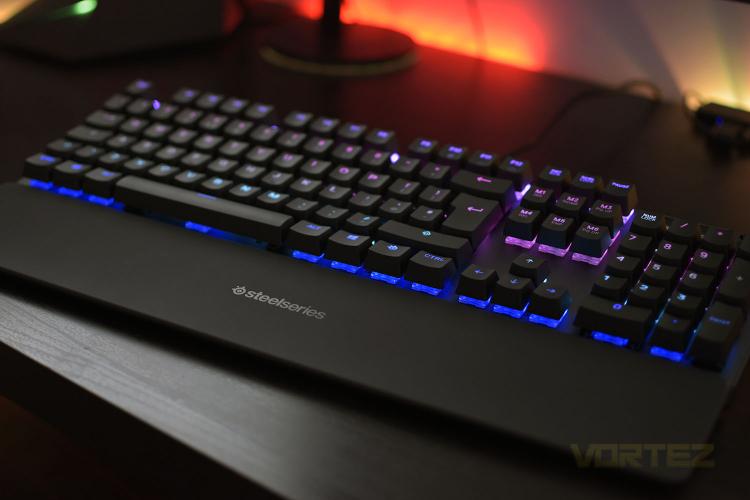
RGB lighting. Which gaming keyboard would be complete without it? Well, the Apex 5 has it, and it has a lot of it. The Engine 3 software suite is rammed full of really great preset effects if you like to flick something on quickly, but it also allows a fairly decent array of customisability if you like that sort of thing. The lighting is bright and shines through the keycaps nicely but it does tend to look a little more pastel-like than other keyboards, though let it be known that we’re personally a fan of that.
Using the keyboard on a daily basis for standard office-based tasks was good, the standard layout of the keys with the rubber-coated wrist rest provide a comfortable experience but when you step things up a gear and launch a few games, the keyboard is really able to show it’s true colours, both metaphorically and literally. Raising your wrist away from the desk for prolonged periods, without the aid of a rest, can put some serious strain on your wrist and hands, particularly so with the height of mechanical boards with the raised switches and thick keycaps. Thankfully SteelSeries are aware of this problem and haven’t removed the rest from the Apex 5 compared to the 7 and Pro.
Typing for long periods, such as when typing this very review, really opens your eyes to the subtle differences that are present within a keyboard’s switch type. We were a little sceptical at first, as we’re sure you are too, but SteelSeries have largely pulled it off. The tactile feedback hasn’t been lost at all, as they promised, and the key actuates with the audible click as it should. They’ve even designed the stems to accommodate keycaps designed for MX keyboards, as well as maintaining a standard-sized bottom row, so you can swap out the caps if you really want to. It’s evident that the switches aren’t produced to the same exacting standards that you expect from a true mechanical switch, and the 20M keystroke lifecycle falls way short of the 50-100M you get from other boards but it’s most of the way there. SteelSeries have done well here and we look forward to seeing if they attempt to mimic other switch types in their new Hybrid style.
We extensively tested the OLED screen on the Apex 7 and Pro keyboards and found that, while it’s a nifty feature, it does lack any real substance. For one, it’s not visible from a typical seating position and requires you to have your head almost directly over the keyboard to see it, rendering it pretty much useless as a means of receiving notifications. The main issue, though, is that using a wheel and one button to navigate the menu systems just doesn’t feel all that natural or intuitive. It is really fun to play with and put fancy GIFs on though, so providing it doesn’t increase the price of the keyboard by much, we’re more than happy for SteelSeries to keep including this.
RGB lighting. Which gaming keyboard would be complete without it? Well, the Apex 5 has it, and it has a lot of it. The Engine 3 software suite is rammed full of really great preset effects if you like to flick something on quickly, but it also allows a fairly decent array of customisability if you like that sort of thing. The lighting is bright and shines through the keycaps nicely but it does tend to look a little more pastel-like than other keyboards, though let it be known that we’re personally a fan of that.


