
Removing the panels from the V5 Black Edition reveals the accessories kit that is included with the package. We have a manual, set of screws, three expansion plate covers, four cable tidies, wire saddle, lock bracket, buzzer alarm, and 3.5" bay cover. The instructions manual is actually very well written, is comprehensive and helpful should you need to use it.
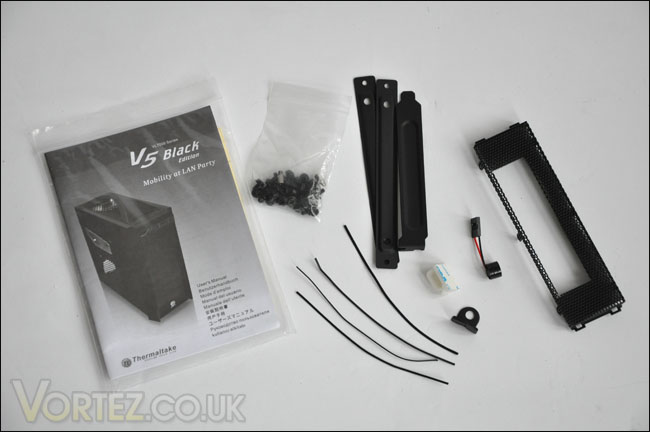
All of the accessories that are bundled with the V5 Black Edition
With the side panels off, we want to take a good look at the insides of the V5 Black Edition and the first thing to draw our attention on is the tool-less design of optical drive mounting. I've seen the same method used on NZXT cases, its a good move. It reduces the hassle of having to fiddle about with screws and however delicate it may look - does keep things rather secure. Mounting the HDD's seems to require the need to slot the device into a tray and either into the top with the optical drive or beneath. If you do opt for the latter, an optional intake fan can be mounted to encourage airflow and HDD cooling.
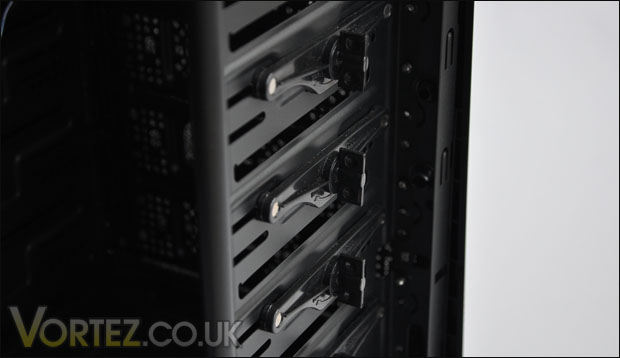
Easy to install devices
Concerning the cooling abilities of the V5 Black Edition, there is a 120mm rear exhaust fan in the usual spot, and a 200mm LED fan at the top of the case. Check the mounting holes on the motherboard tray nearby. They are far too close to that 200mm fan. This undoubtedly cause issues with the installation a little later, fitting large heatsinks in such a tight space is going to prove quite a challenge. More on this later.
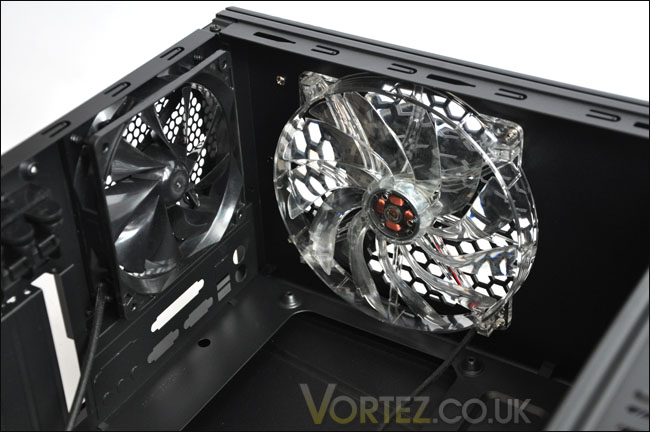
Both the fans that come with the V5 Black Edition. Notice the mounting holes, they are close to that 200mm fan!
If we take a look round the other side of the case, we can see that there is a significantly large CPU cooler back plate cutout. This allows the removal of CPU coolers to be that much quicker. It removes the annoyance of having to remove the entire motherboard just to get the backplate off the underside. A novel idea, we are seeing more and more brands doing this, but whilst they may implement such an idea - most are not giving a large enough space to cater for different socket types. It will be interesting to see how this opening facilitates the platform I am using a little later.
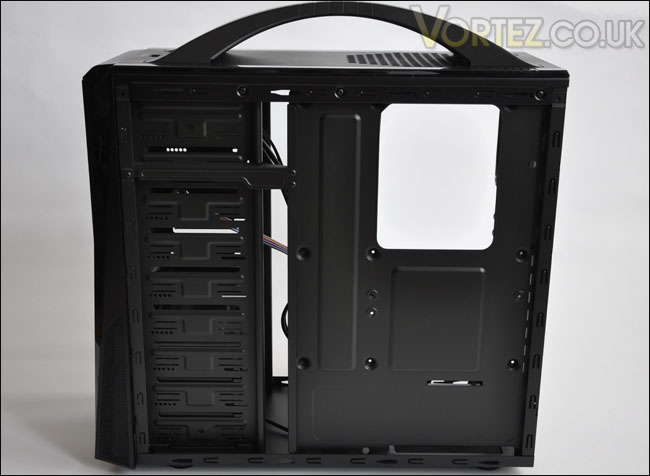
A nice, large cut out for the backplate access
There are plenty of nice gaps and openings on this case to tuck away cables, and looking at the below image you can see that the feet are rubber to prevent slipping and marking surfaces.
All of the accessories that are bundled with the V5 Black Edition
With the side panels off, we want to take a good look at the insides of the V5 Black Edition and the first thing to draw our attention on is the tool-less design of optical drive mounting. I've seen the same method used on NZXT cases, its a good move. It reduces the hassle of having to fiddle about with screws and however delicate it may look - does keep things rather secure. Mounting the HDD's seems to require the need to slot the device into a tray and either into the top with the optical drive or beneath. If you do opt for the latter, an optional intake fan can be mounted to encourage airflow and HDD cooling.
Easy to install devices
Concerning the cooling abilities of the V5 Black Edition, there is a 120mm rear exhaust fan in the usual spot, and a 200mm LED fan at the top of the case. Check the mounting holes on the motherboard tray nearby. They are far too close to that 200mm fan. This undoubtedly cause issues with the installation a little later, fitting large heatsinks in such a tight space is going to prove quite a challenge. More on this later.
Both the fans that come with the V5 Black Edition. Notice the mounting holes, they are close to that 200mm fan!
If we take a look round the other side of the case, we can see that there is a significantly large CPU cooler back plate cutout. This allows the removal of CPU coolers to be that much quicker. It removes the annoyance of having to remove the entire motherboard just to get the backplate off the underside. A novel idea, we are seeing more and more brands doing this, but whilst they may implement such an idea - most are not giving a large enough space to cater for different socket types. It will be interesting to see how this opening facilitates the platform I am using a little later.
A nice, large cut out for the backplate access
There are plenty of nice gaps and openings on this case to tuck away cables, and looking at the below image you can see that the feet are rubber to prevent slipping and marking surfaces.


