
Intel Core 2 Duo E2160
ASUS P5KC LGA775
MSI 8800GTX
XFX 7900GT
Samsung Spinpoint 250GB
Silverstone Strider 560W
The first thing I put into the V5 Black Edition was the PSU. I like to try and get all the cabling laid in and organized. This went ahead no problems at all. The cabling actually tucks away quite well, there are some good gaps as I mentioned on the previous page.
Problems did become apparent however when trying to install the main component into the case – the motherboard. As I referred to on the previous page, the motherboard mounting holes are far too close to the top of the case, let alone the 200mm fan that is mounted to the top of the case. As you can see from the photograph, the CPU Cooler (Noctua NH-U12P) is actually touching the fan. There is actually over an inch separating the mounting holes on the motherboard to the motherboard tray.
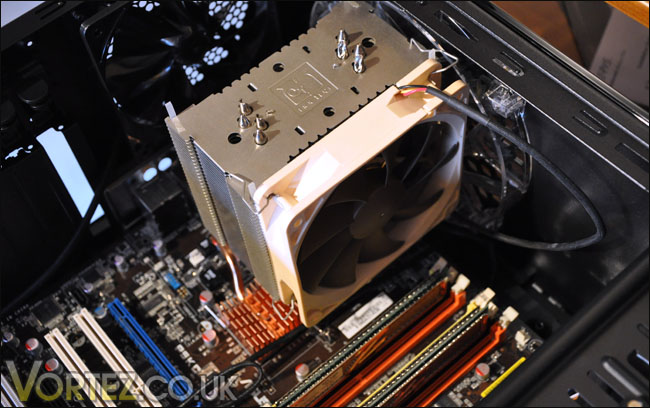
Cannot install motherboard, 200mm fan is an obstruction. Those mounting holes are too close
So the only solution to this is to remove the 200mm fan, and I can tell you – this is no easy task. Removal of the entire top panel of the case is required, and then the removal of the handle to even enable viewing of the screws holding in the fan.
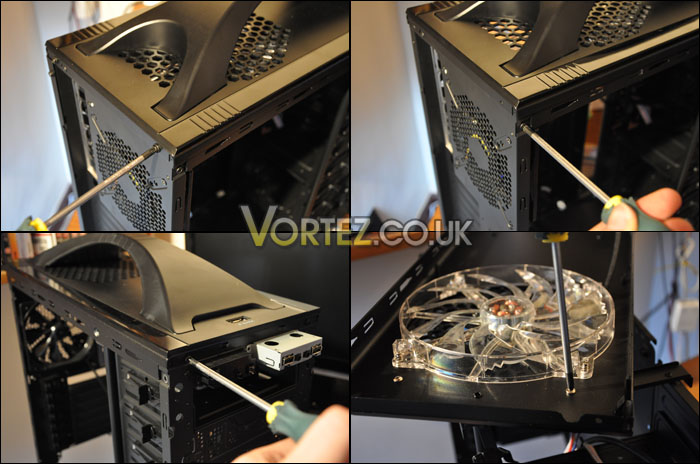
Removing the 200mm fan requires over 12 screws to be removed. Get your screwdriver out and a cuppa!
ASUS P5KC LGA775
MSI 8800GTX
XFX 7900GT
Samsung Spinpoint 250GB
Silverstone Strider 560W
The first thing I put into the V5 Black Edition was the PSU. I like to try and get all the cabling laid in and organized. This went ahead no problems at all. The cabling actually tucks away quite well, there are some good gaps as I mentioned on the previous page.
Problems did become apparent however when trying to install the main component into the case – the motherboard. As I referred to on the previous page, the motherboard mounting holes are far too close to the top of the case, let alone the 200mm fan that is mounted to the top of the case. As you can see from the photograph, the CPU Cooler (Noctua NH-U12P) is actually touching the fan. There is actually over an inch separating the mounting holes on the motherboard to the motherboard tray.
Cannot install motherboard, 200mm fan is an obstruction. Those mounting holes are too close
So the only solution to this is to remove the 200mm fan, and I can tell you – this is no easy task. Removal of the entire top panel of the case is required, and then the removal of the handle to even enable viewing of the screws holding in the fan.
Removing the 200mm fan requires over 12 screws to be removed. Get your screwdriver out and a cuppa!


