
Unlike some keyboards that arrive with a 6-month-old Firmware and take 5 minutes to set up, the CORSAIR K95 RGB Platinum XT was as simple as plugging in and away it went, with the latest version of the iCUE software installed, obviously. The lighting lit up immediately and started showing off what it can do. To fully utilise the keyboard, you will require two USB 2.0 ports, one for the keyboard itself and the other for the USB 2.0 passthrough.
First impressions with the keyboard were dominated by just how much real estate the thing requires, it’s by no means a small keyboard, but it does offer brilliant comfort and a no-compromise approach to giving you the weapons you need to win games. The keyboard feels well-made, as do all of CORSAIR’s keyboards it has to be said, and resists movement on the desk well, thanks to the large rubber pads on the base and its heavy weight.
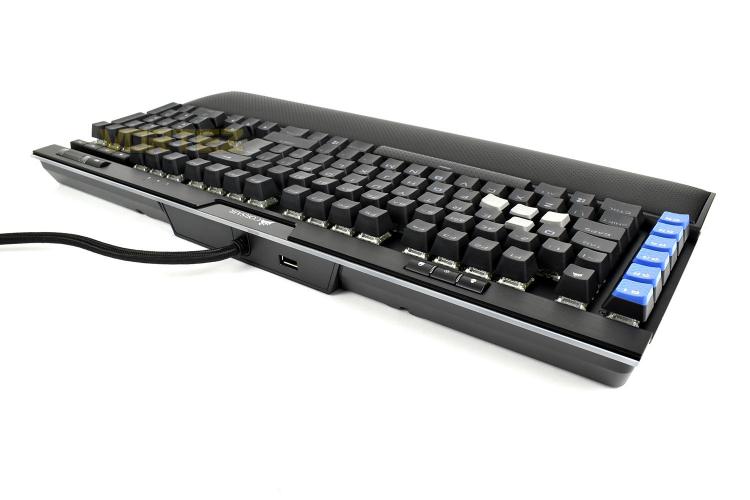
The sample we were provided is loaded with the CHERRY MX Speed switches, these are tuned to provide a fast and linear switch that shaves off valuable milliseconds, with it’s 1.2mm actuation point as opposed to the typical 2mm, to give you the edge in your games; while that’s all well and good, the typing experience isn’t the best we’ve experienced so you’ll be wanting to go for the CHERRY MX Blue or Brown keyswitches if you plan to use it for a lot of typing. However, for gaming, there isn’t really a better choice. We loaded up the latest Call of Duty: Modern Warfare and War Thunder, two games we’re very fond of at the moment, and both performed perfectly. We then switched out the ordinary, flat keycaps and replaced the WASD keys with their checker-plate alternatives. These keycaps are curved and raised slightly to make sure you know exactly where your fingers are, and thanks to the textured top, your fingers won’t slip about like they might otherwise.
The keyboard offers full anti-ghosting to ensure your keypresses are always registered regardless of how many you press at once, including the multimedia keys and profile switch etc.
Comfort. This is something I’ve wanted to see for a long, long time on a CORSAIR keyboard, a removable, plush, leatherette palm rest with actual proper cushioning. Some users prefer not to use a wrist rest and that’s fine, it’s optional, but those of us who do like to keep our wrists straight and have somewhere to lean, this is one of the nicest we’ve experienced (beaten only by the Razer BlackWidow Elite’s palm rest, but only just.) The hard plastic, even with the reversible insert that you got with the previous K95, just wasn’t up to scratch.
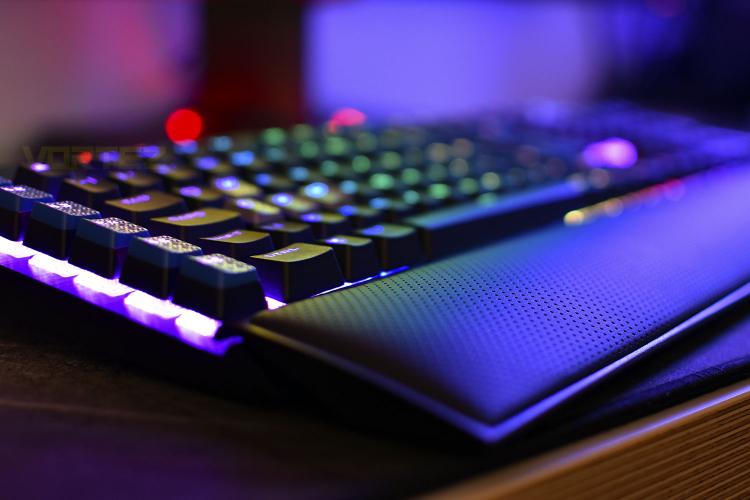
The RGB lighting is somewhere we expected this keyboard to excel. CORSAIR have strived to produce their CAPELLIX LEDs (which are brighter, more vibrant, less power hungry etc) but we don’t see those in the K95 Platinum XT, sadly. This is largely down to CHERRY using their own RGB LEDs within the key’s housing but we suspect the partnership between CORSAIR and CHERRY to be strong enough that a deal could be brokered. Sadly, because of that, the RGB lighting isn’t quite bright enough for a keyboard in 2020, we’ve seen much brighter and more vibrant keyboards from other manufacturers in recent months/years. Having said that, the iCUE software does give plenty of options for effects, and thanks to CORSAIR’s dominance within the PC Gaming sector, you are able to tie in lighting effects across fans, mice, headsets, RGB strips, mousepads, the whole works, for that proper synchronised approach.
One thing that CORSAIR have got down to a T is the volume wheel and multimedia keys, they’re visible even from the most acute of angles to the keyboard and the aluminium scroll wheel feels amazing, it’s weighted perfectly and lacks the notchy feel of other implementations that we’ve seen. The only criticism we have here is the mushy synapse buttons that have been used here; we’d like to see CORSAIR do something about this in the future to imitate something a little closer to the CHERRY MX keyswitches used everywhere else.
First impressions with the keyboard were dominated by just how much real estate the thing requires, it’s by no means a small keyboard, but it does offer brilliant comfort and a no-compromise approach to giving you the weapons you need to win games. The keyboard feels well-made, as do all of CORSAIR’s keyboards it has to be said, and resists movement on the desk well, thanks to the large rubber pads on the base and its heavy weight.
The sample we were provided is loaded with the CHERRY MX Speed switches, these are tuned to provide a fast and linear switch that shaves off valuable milliseconds, with it’s 1.2mm actuation point as opposed to the typical 2mm, to give you the edge in your games; while that’s all well and good, the typing experience isn’t the best we’ve experienced so you’ll be wanting to go for the CHERRY MX Blue or Brown keyswitches if you plan to use it for a lot of typing. However, for gaming, there isn’t really a better choice. We loaded up the latest Call of Duty: Modern Warfare and War Thunder, two games we’re very fond of at the moment, and both performed perfectly. We then switched out the ordinary, flat keycaps and replaced the WASD keys with their checker-plate alternatives. These keycaps are curved and raised slightly to make sure you know exactly where your fingers are, and thanks to the textured top, your fingers won’t slip about like they might otherwise.
The keyboard offers full anti-ghosting to ensure your keypresses are always registered regardless of how many you press at once, including the multimedia keys and profile switch etc.
Comfort. This is something I’ve wanted to see for a long, long time on a CORSAIR keyboard, a removable, plush, leatherette palm rest with actual proper cushioning. Some users prefer not to use a wrist rest and that’s fine, it’s optional, but those of us who do like to keep our wrists straight and have somewhere to lean, this is one of the nicest we’ve experienced (beaten only by the Razer BlackWidow Elite’s palm rest, but only just.) The hard plastic, even with the reversible insert that you got with the previous K95, just wasn’t up to scratch.
The RGB lighting is somewhere we expected this keyboard to excel. CORSAIR have strived to produce their CAPELLIX LEDs (which are brighter, more vibrant, less power hungry etc) but we don’t see those in the K95 Platinum XT, sadly. This is largely down to CHERRY using their own RGB LEDs within the key’s housing but we suspect the partnership between CORSAIR and CHERRY to be strong enough that a deal could be brokered. Sadly, because of that, the RGB lighting isn’t quite bright enough for a keyboard in 2020, we’ve seen much brighter and more vibrant keyboards from other manufacturers in recent months/years. Having said that, the iCUE software does give plenty of options for effects, and thanks to CORSAIR’s dominance within the PC Gaming sector, you are able to tie in lighting effects across fans, mice, headsets, RGB strips, mousepads, the whole works, for that proper synchronised approach.
One thing that CORSAIR have got down to a T is the volume wheel and multimedia keys, they’re visible even from the most acute of angles to the keyboard and the aluminium scroll wheel feels amazing, it’s weighted perfectly and lacks the notchy feel of other implementations that we’ve seen. The only criticism we have here is the mushy synapse buttons that have been used here; we’d like to see CORSAIR do something about this in the future to imitate something a little closer to the CHERRY MX keyswitches used everywhere else.


