
To say that our experience with the Uranium was mixed would be an understatement.
Our own wireless performance problems shouldn't be the same for all environments but have to be a concern for anyone not either already using a 2.4GHz wireless mouse successfully or well out of a wirelessly congested area. Similar mice would likely have much the same issues in similar circumstances, but in some cases the design mitigates the impact by offering a dual-mode for wired USB operation. That said, performance would have been terrible if the Uranium relied on sending an entire macro wirelessly; in this respect the decision to offload on-board memory and processing to a base station is at least partially vindicated.
The problems were made all the more frustrating by the fact that the Uranium's build quality is excellent, and this is far closer to the standard we expected from the Krypton after the strong showing of the Osmium keyboard. With buttons which are responsive and reassuring the Uranium is everything the Krypton wasn't, and more. As a mousing platform the Uranium is exceptionally stable, with no wobble on hard flat surfaces or pitching forward or back and excellent balance considering the size of the batteries used.
Button placement was unusual considering that these days they tend to be packed into the side wall for use with the thumb. It’s not problematic, but does mean that it’s less suited for FPS gaming and fast reflex titles than could otherwise be. MMO gamers by comparison should have no problems adapting so long as they’re willing to utilise the whole of the available bindings. We believe that claw grip users will find most success with the G1 and G2 buttons especially, but your mileage may vary.
There’s no getting away from the fact that compared to competitors the software is poor, and not just due to a lack of polish; when you look beyond macros alone the functionality is limited. You cannot bind profiles to application launches, set per-profile DPI levels, or a number of other things we take for granted on premium mice software. Those fresh to the concept of offloading work to mouse macros and who have done little to customise core aspects of the mouse performance will be satisfied, but the true high-end enthusiast will be disappointed.
The Aivia Uranium could have been a great product, but it’s undermined by weak software and a reliance on wireless performance which it isn't guaranteed to deliver.
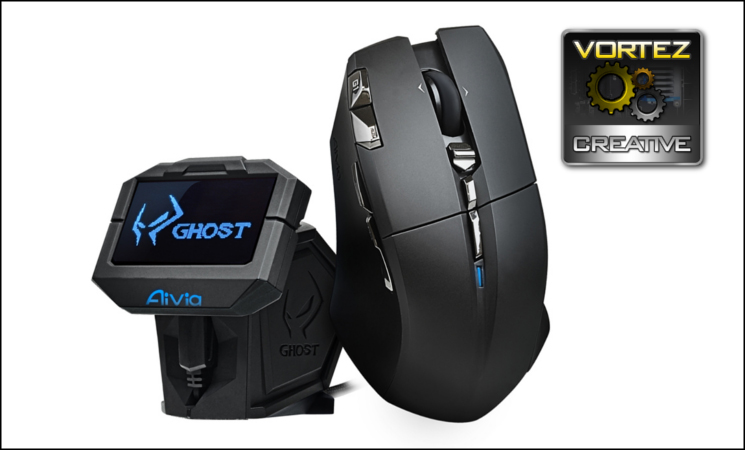
The GIGABYTE Aivia Uranium is a curious beast thanks to its GHOST Macro Module, which acts as an external macro engine. In theory this should reduce the performance implications to macros over wireless, but reception inconsistencies can still occur in areas where wireless networks are heavily used. Nonetheless the approach is novel and the overall build quality is as match for any mouse we have reviewed thus far. Also hampered by limited software and heavyweight bulk, this is one to try before laying down your money. The Uranium gains our Creative Award, but important reservations remain.
Pros
- Five Profiles
- Onboard memory
- 10 programmable buttons
- Very good battery life
- Sharp OLED display
- Usable whilst charging.
Cons
- Poor response in wirelessly congested areas
- Very limited software for a mouse in this class
- Heavy
- Button placement leads to a relatively high learning curve.
Tips
= High performance variability makes it ideal for a trial period.
- Five Profiles
- Onboard memory
- 10 programmable buttons
- Very good battery life
- Sharp OLED display
- Usable whilst charging.
Cons
- Poor response in wirelessly congested areas
- Very limited software for a mouse in this class
- Heavy
- Button placement leads to a relatively high learning curve.
Tips
= High performance variability makes it ideal for a trial period.
Click here for an explanation of our awards at Vortez.net. Thanks to GIGABYTE for providing this review sample.


