
Testing
We will be using an ElmorLabs PMD2 that monitors and measures voltage, current, and power flowing through the CPU, GPU and motherboard power cables.

Our testing methodology will now be using OCBase’s OCCT Enterprise Edition software for power loading and monitoring. Tweaking the OCCT Stability Test, we can set different power loads for the PSU easier rather than playing around with various software to achieve set power loads. All testing is conducted using the 230V residential power standard.

Methodology
Having more testing points with the ElmorLabs PMD2 – two 8-pin EPS connectors (EPS1 and EPS2), three +12V 8-pin PCIE (PCIE1, PCIE2, and PCI3), and readings on the 24-pin which include +12V, +5, and +3.3. We will be monitoring and recording the voltages and wattage on each of these power cables. The PMD2 cannot monitor the +12V on the SATA/MOLEX power cables. For that, we will still be using a multimeter to also monitor the voltages delivered to the SATA/MOLEX cables.
Power load will be at 10% increments using the OCCT Stability Test running for 5 minutes – as much as our current testing setup allows which is currently 750W~800W with the following testing configuration below:
Results
The recorded voltages represent the average readings taken during each 5-minute power-load run using the OCCT Stability Test.
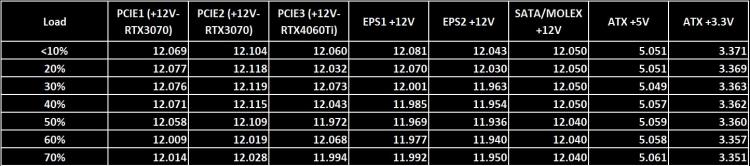
Voltage
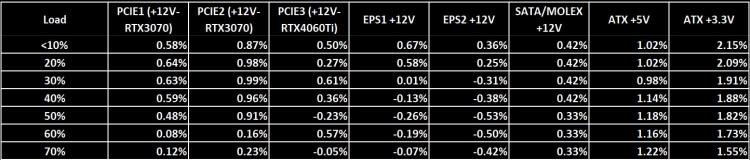
Voltage Regulation
OCCT Stability Tests
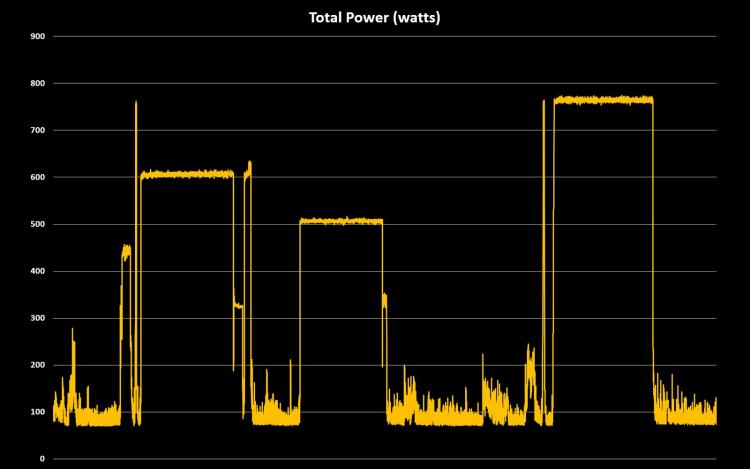
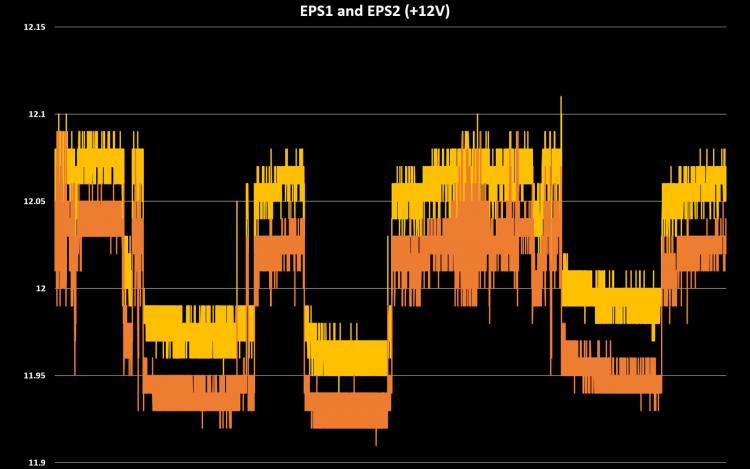
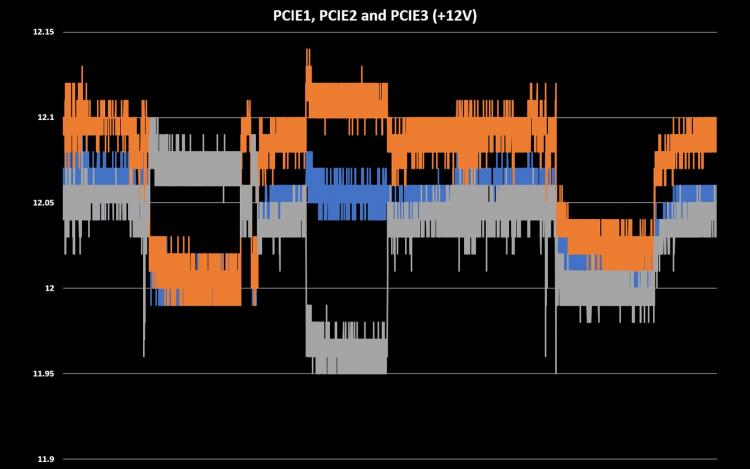
The graphs above illustrate the 50%, 60%, and maximum workload tests using the OCCT Stability Test. While adjusting the settings, I inadvertently triggered the 60% load before the 50% load. This is reflected in the total power graph, where the first plateau sits at approximately 600W, followed by the 500W plateau.
The SAMA G1000 does have an impressive +12V voltage regulation which is all under 1.0%. However, the +5V and +3.3V aren’t as good having voltage regulation between 1~2%. Still impressive for a relatively affordable Gold-rated power supply unit.

Maximum Power Load - 5-minute Run Readings
The maximum power load our setup can pull is approximately 760W on PMD2 which is reading 800W on our power meter for the entire system.
Acoustics
The SAMA G1000 employs intelligent fan speed control, enabling fanless operation when temperatures remain below 55°C. As a result, the PSU runs at 0 dBA under light loads, with the fan beginning to spin at roughly 400W. During our OCCT Stability Test targeting a 40% power load, the sound meter registered 55 dBA — though this figure also includes noise from the CPU cooler and two graphics cards running close to 100% RPM. The SAMA G1000 did achieve Cybenetics Lambda A- noise level rating on 230V, Standard++ for 115V. See Cybenetics certification here.
Overall, the G1000 remains effectively silent at low loads, largely because the fan does not operate in this range. Personally, I prefer active cooling even at lighter workloads, but the G1000 does not offer a switch to toggle semi-passive mode on or off, unlike the Seasonic PRIME TX-1600 Noctua Edition’s hybrid cooling switch.
We will be using an ElmorLabs PMD2 that monitors and measures voltage, current, and power flowing through the CPU, GPU and motherboard power cables.
Our testing methodology will now be using OCBase’s OCCT Enterprise Edition software for power loading and monitoring. Tweaking the OCCT Stability Test, we can set different power loads for the PSU easier rather than playing around with various software to achieve set power loads. All testing is conducted using the 230V residential power standard.
We would like to thank Adrien Stevens at OCBase for providing us the software to improve our testing. OCCT is available in various versions including Personal, Pro, Enterprise and Enterprise+. Users can avail the Personal version for free. Learn more and download OCCT at OCbase.com and on Steam.
Methodology
Having more testing points with the ElmorLabs PMD2 – two 8-pin EPS connectors (EPS1 and EPS2), three +12V 8-pin PCIE (PCIE1, PCIE2, and PCI3), and readings on the 24-pin which include +12V, +5, and +3.3. We will be monitoring and recording the voltages and wattage on each of these power cables. The PMD2 cannot monitor the +12V on the SATA/MOLEX power cables. For that, we will still be using a multimeter to also monitor the voltages delivered to the SATA/MOLEX cables.
Power load will be at 10% increments using the OCCT Stability Test running for 5 minutes – as much as our current testing setup allows which is currently 750W~800W with the following testing configuration below:
CPU: Intel Core i7-13700K (5.3GHz)
Cooling: Noctua NH-D15 G2
Motherboard: GIGABYTE Z790 AORUS EXTREME X
Graphics Card: GIGABYTE GeForce RTX 3070 EAGLE OC / COLORFUL iGame GeForce RTX 4060 Ti
Memory: ADATA XPG Lancer DDR5-8000 32GB Kit
Storage: ADATA Legend 960 Max 1TB / 2TB Seagate SkyHawk 5900 RPM
Cooling: Noctua NH-D15 G2
Motherboard: GIGABYTE Z790 AORUS EXTREME X
Graphics Card: GIGABYTE GeForce RTX 3070 EAGLE OC / COLORFUL iGame GeForce RTX 4060 Ti
Memory: ADATA XPG Lancer DDR5-8000 32GB Kit
Storage: ADATA Legend 960 Max 1TB / 2TB Seagate SkyHawk 5900 RPM
Results
The recorded voltages represent the average readings taken during each 5-minute power-load run using the OCCT Stability Test.
Voltage
Voltage Regulation
OCCT Stability Tests
The graphs above illustrate the 50%, 60%, and maximum workload tests using the OCCT Stability Test. While adjusting the settings, I inadvertently triggered the 60% load before the 50% load. This is reflected in the total power graph, where the first plateau sits at approximately 600W, followed by the 500W plateau.
The SAMA G1000 does have an impressive +12V voltage regulation which is all under 1.0%. However, the +5V and +3.3V aren’t as good having voltage regulation between 1~2%. Still impressive for a relatively affordable Gold-rated power supply unit.
Maximum Power Load - 5-minute Run Readings
The maximum power load our setup can pull is approximately 760W on PMD2 which is reading 800W on our power meter for the entire system.
Acoustics
The SAMA G1000 employs intelligent fan speed control, enabling fanless operation when temperatures remain below 55°C. As a result, the PSU runs at 0 dBA under light loads, with the fan beginning to spin at roughly 400W. During our OCCT Stability Test targeting a 40% power load, the sound meter registered 55 dBA — though this figure also includes noise from the CPU cooler and two graphics cards running close to 100% RPM. The SAMA G1000 did achieve Cybenetics Lambda A- noise level rating on 230V, Standard++ for 115V. See Cybenetics certification here.
Overall, the G1000 remains effectively silent at low loads, largely because the fan does not operate in this range. Personally, I prefer active cooling even at lighter workloads, but the G1000 does not offer a switch to toggle semi-passive mode on or off, unlike the Seasonic PRIME TX-1600 Noctua Edition’s hybrid cooling switch.


