
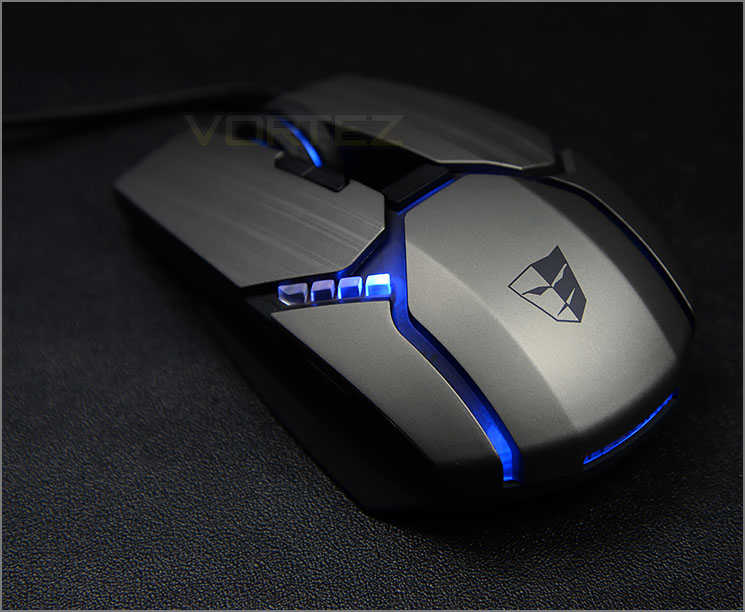
This is only our second Tesoro product review but once again we are greeted by an aesthetic masterpiece. If it’s one thing they are good at, it’s definitely the styling and finesse.
Gandiva is attractive to the eye and although it uses plastic construction, the brushed metal appearance is very much welcomed. Tesoro has given this mouse a multitude of buttons to customise and they are all placed and in decent locations for quick and easy access.
In all our testing we found this gaming mouse to be very accurate, regardless of the environment. We experienced no issues with traction and glide on a number of different surface textures and the option to tweak the DPI on-the-fly with a value of up to 8200 is very handy.
As we found with the Lobera Supreme, the software for tweaking Gandiva is unintuitive and cumbersome to use. Finding the advanced settings for example isn’t straight forward and we actually stumbled across them through frustration. Altering the LED lighting cannot be done exclusively on its own either, instead, another setting has to be changed in order for the colour to actually adjust.
Also, as we mentioned previously in the review, for small-medium size hands the left mouse button appears to be difficult to press at times because of the size and the angle it sits at. The scrolling wheel on Gandiva cycles through its increments far too easy – the wheel feels loose and we would like to see sharper, tighter increments so that this isn’t accidentally used.
Gandiva is priced at £45 GBP / $60 USD has some fierce competition in this particular price-range but Tesoro need to improve their software if they want to be in with a chance of taking the top spot.
Tesoro’s Gandiva gaming mouse is one of the best looking solutions we’ve seen. This mouse oozes style and has all the features you would expect from a solid gaming peripheral but it isn’t without weakness – the software needs improving and a few modifications to the design would be a worthwhile consideration.
Pros
+ Visually stunning
+ Good button placement
+ Traction/Glide works very well
+ Lots of buttons to customise
+ Up to 8200 DPI
Cons
- Software isn’t intuitive
- Difficult to use for smaller hands
- Scrolling wheel increments too loose
+ Visually stunning
+ Good button placement
+ Traction/Glide works very well
+ Lots of buttons to customise
+ Up to 8200 DPI
Cons
- Software isn’t intuitive
- Difficult to use for smaller hands
- Scrolling wheel increments too loose
Click here for an explanation of our awards at Vortez.net.


